Waveshare RP2040
The RP2040 SoC [75] by Raspberry Pi Ltd. is a small sized and low-cost 32-bit dual ARM Cortex-M0+ microcontroller and predestined for versatile board designs. The Waveshare RP2040 board series based on this microcontroller offers a wide range with different scaling factors, in size, features and interfaces for communication, input and output.
Supported Boards
Hardware
Features and Resources |
Printed Circuit Board |
5V/300㎃ 3.3V/500㎃ 3.3V(OUT) 133㎒ 4㎆ 264㎅ RST RGB USB-A UF2 20+9 16 4 2 2 2
Design Data
|
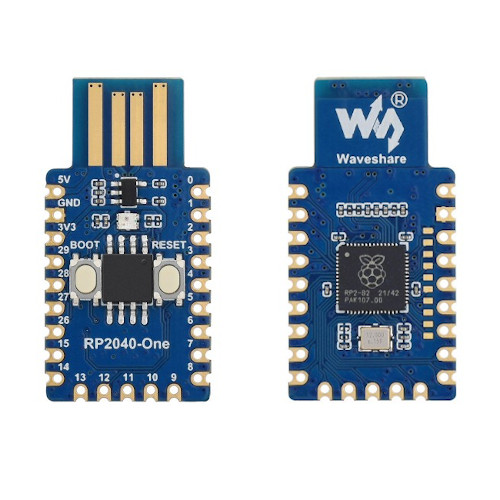
|
Features and Resources |
Printed Circuit Board |
5V/480㎃ 3.3V/800㎃ 3.3V(OUT) 133㎒ 2㎆ 264㎅ RST RGB USB-C UF2 20+9 16 4 2 2 2
Design Data
|
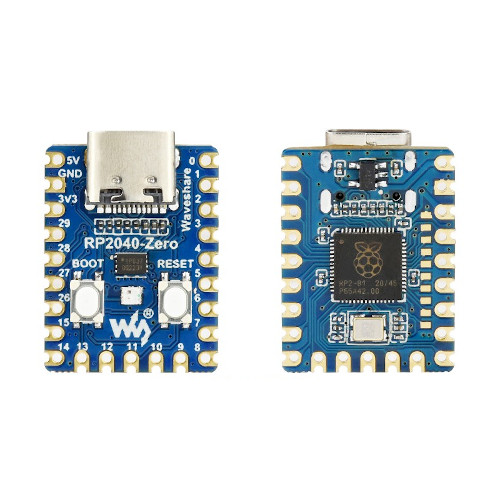
|
Features and Resources |
Printed Circuit Board |
5V/300㎃ 3.3V/500㎃ 3.3V(OUT) 133㎒ 2㎆ 264㎅ RST RGB(5×5) LED(5×5) USB-C UF2 20 16 4 2 2 2
Design Data
|
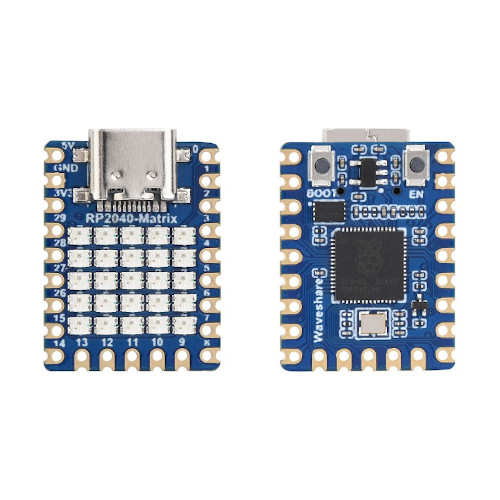
|
Features and Resources |
Printed Circuit Board |
5V/300㎃ 3.3V/500㎃ 3.3V(OUT) 133㎒ 2㎆ 264㎅ RST(FPC-8) RGB USB-C(FPC-8) UF2 20 16 4 2 2 2
Design Data |
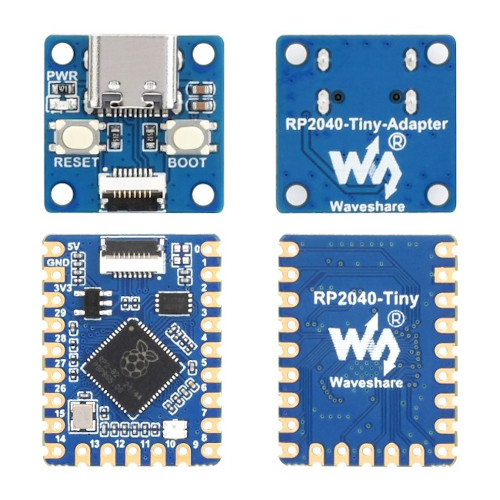
|
Features and Resources |
Printed Circuit Board |
5V/480㎃ 3.3V/800㎃ 3.3V(OUT) 3.3V(EN/PS) 133㎒ 4㎆ 264㎅ RST RGB 10BASE-T USB-C UF2 14 13 3 2 1 2
Design Data
|
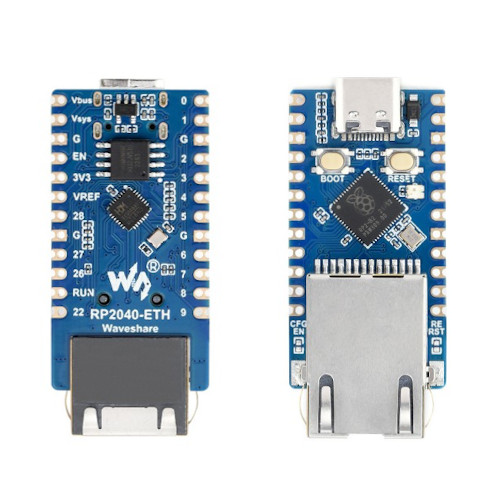
|
Features and Resources |
Printed Circuit Board |
5V/1.1A 3.3V/1.8A 3.3V(OUT) 3.3V(EN/PS) 133㎒ 2㎆ 264㎅ RST BL LCD USB-C UF2 SWD 26 16 3 2 2 2
Design Data
|
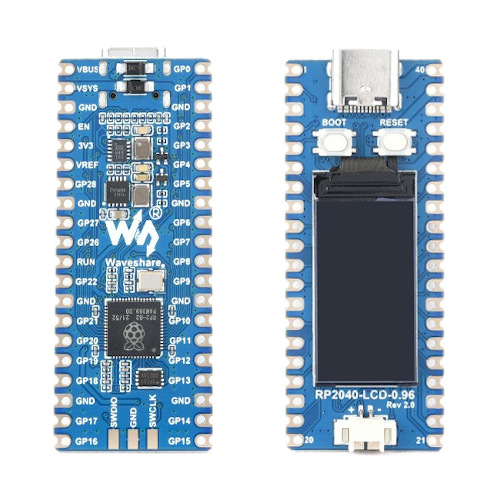
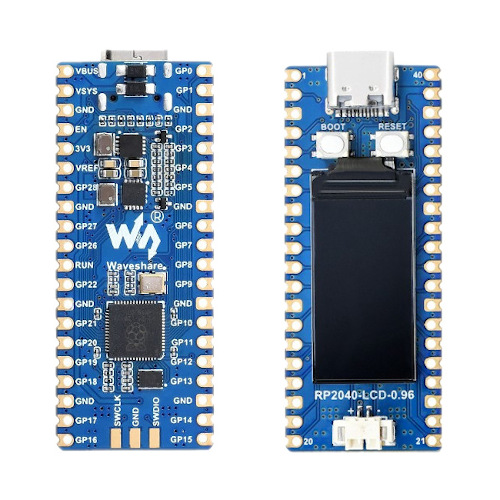
|
Features and Resources |
Printed Circuit Board |
5V/1.1A 3.3V/1.8A 3.3V(OUT) 3.3V(EN/PS) 133㎒ 4㎆/16㎆ 264㎅ RST RED USB-C UF2 SWD 26 16 3 2 2 2
Design Data |
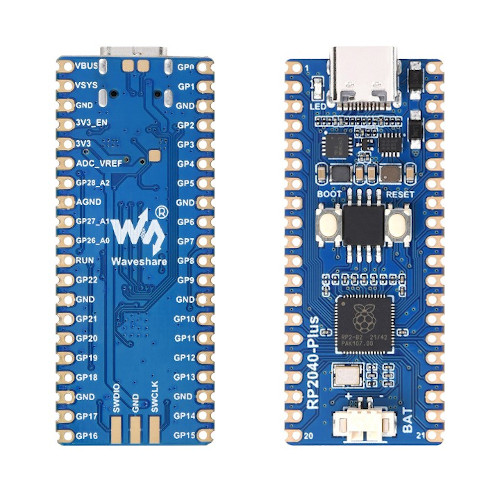
|
Features and Resources |
Printed Circuit Board |
5V/200㎃ 3.3V/300㎃ 3.3V(OUT) 133㎒ 4㎆ 264㎅ LCD TF/microSD USB-A UF2 6 6 2 2 2
Design Data |
|
Positions
|
|---|
|
Data Sheets
|
|---|
|
Data Sheets
|
|---|
|
Data Sheets
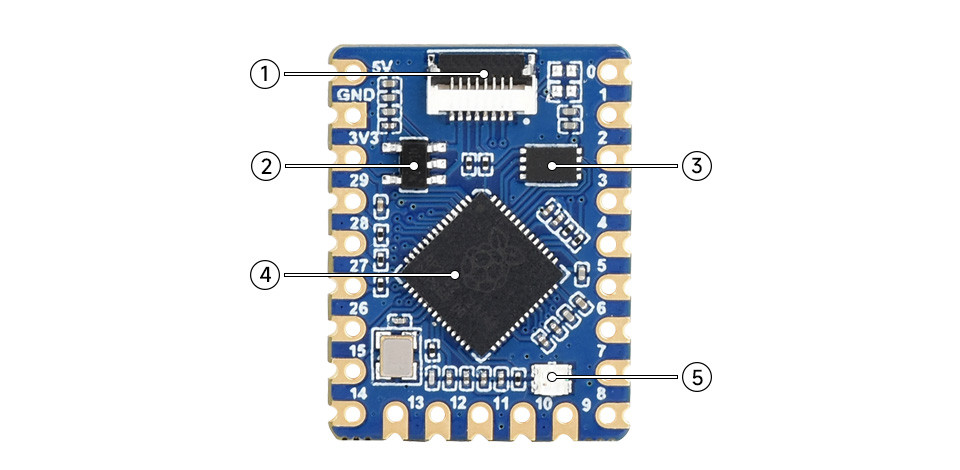
|
|---|
|
Data Sheets
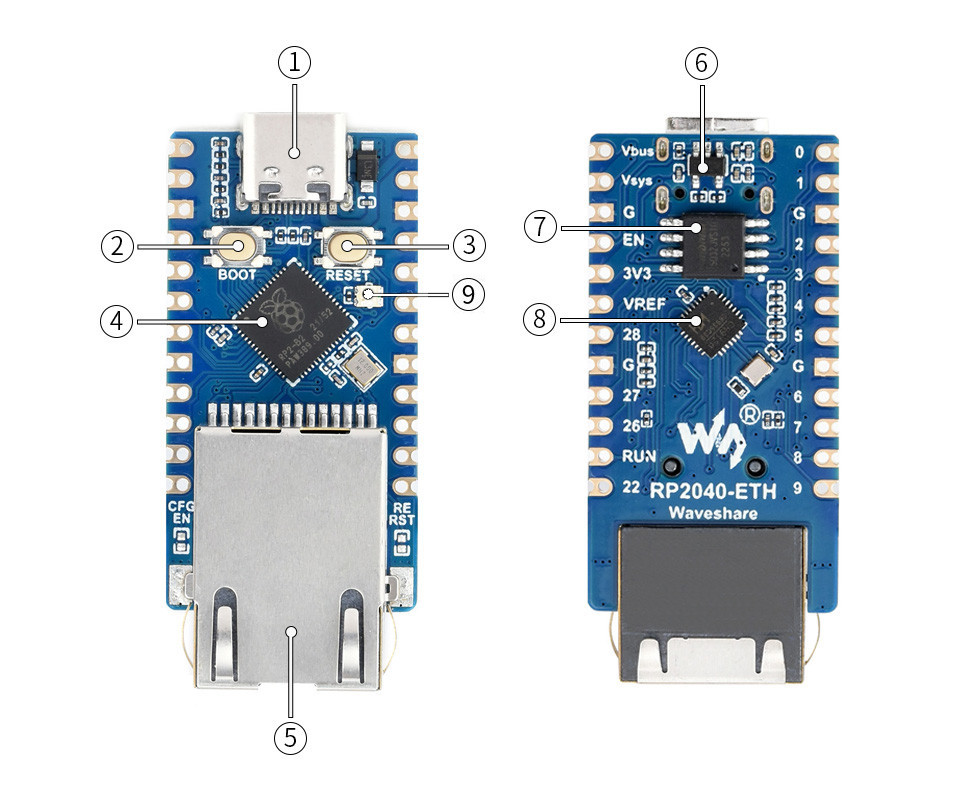
|
|---|
|
Data Sheets
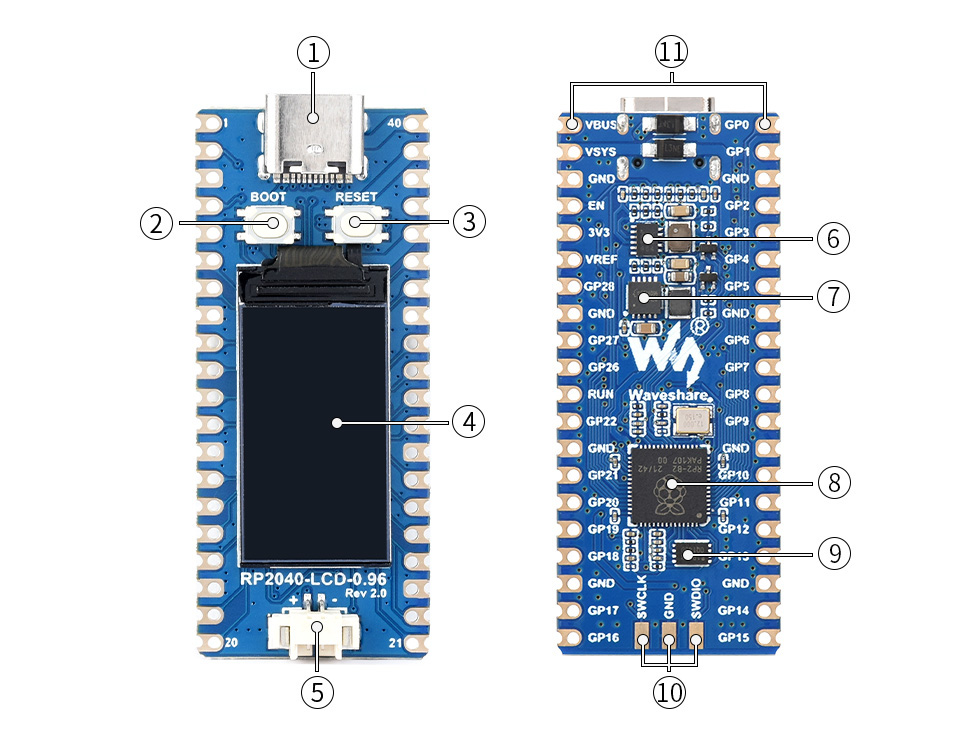
|
|---|
|
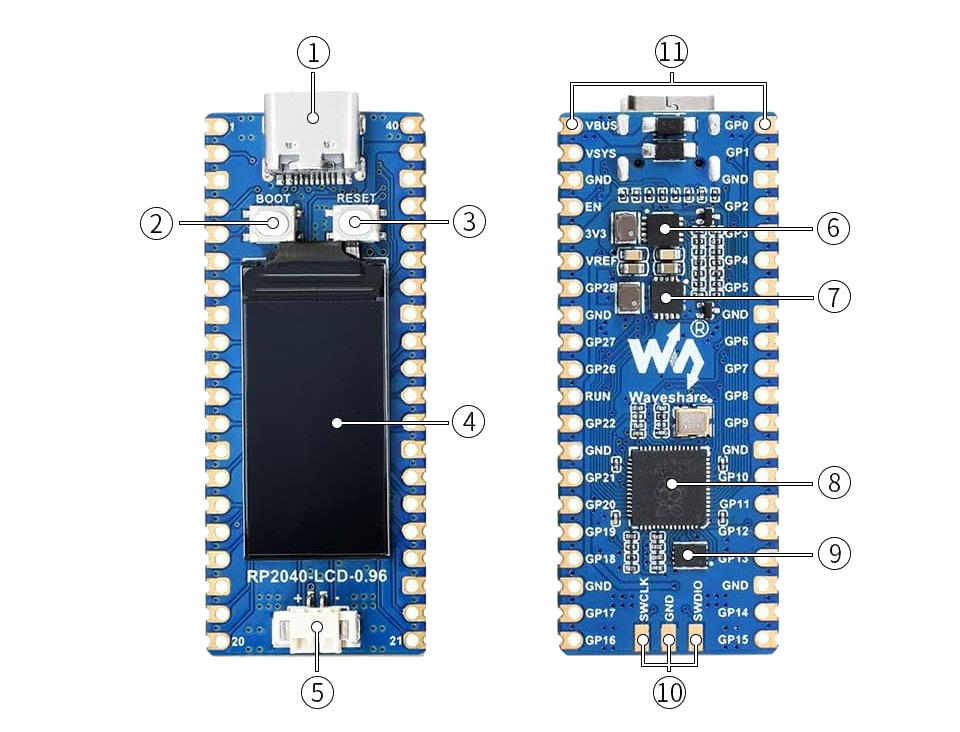
|
|---|
|
Data Sheets
|
|---|
|
Data Sheets
|
|---|
|
Data Sheets
Pinouts
The peripherals of the RP2040 SoC [75] can be routed to various pins on the board. The configuration of these routes can be modified through DTS. Please refer to the datasheet to see the possible routings for each peripheral. The default assignments for the various Waveshare RP2040 boards are defined below separately in a single tab.
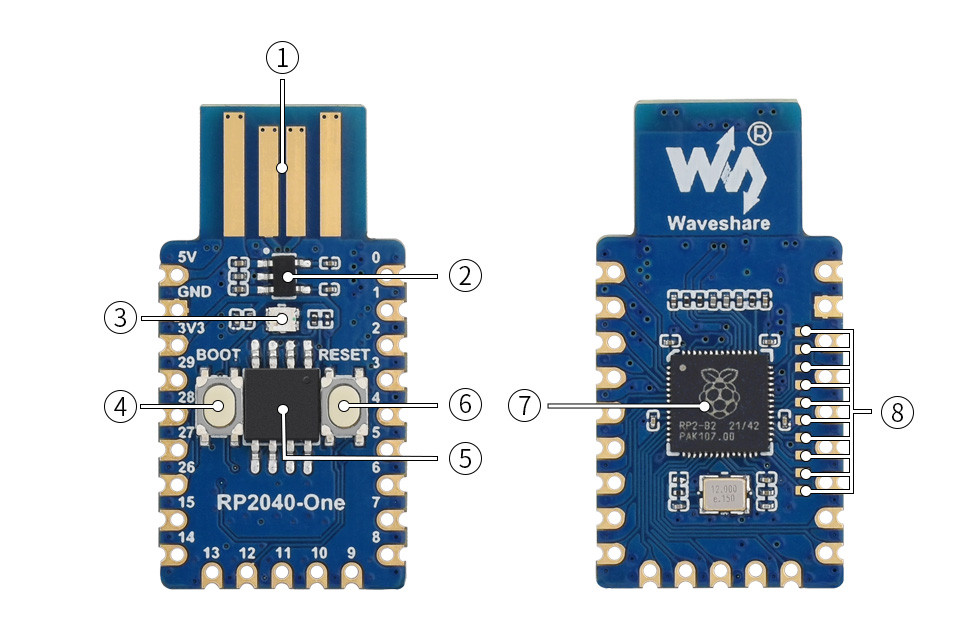
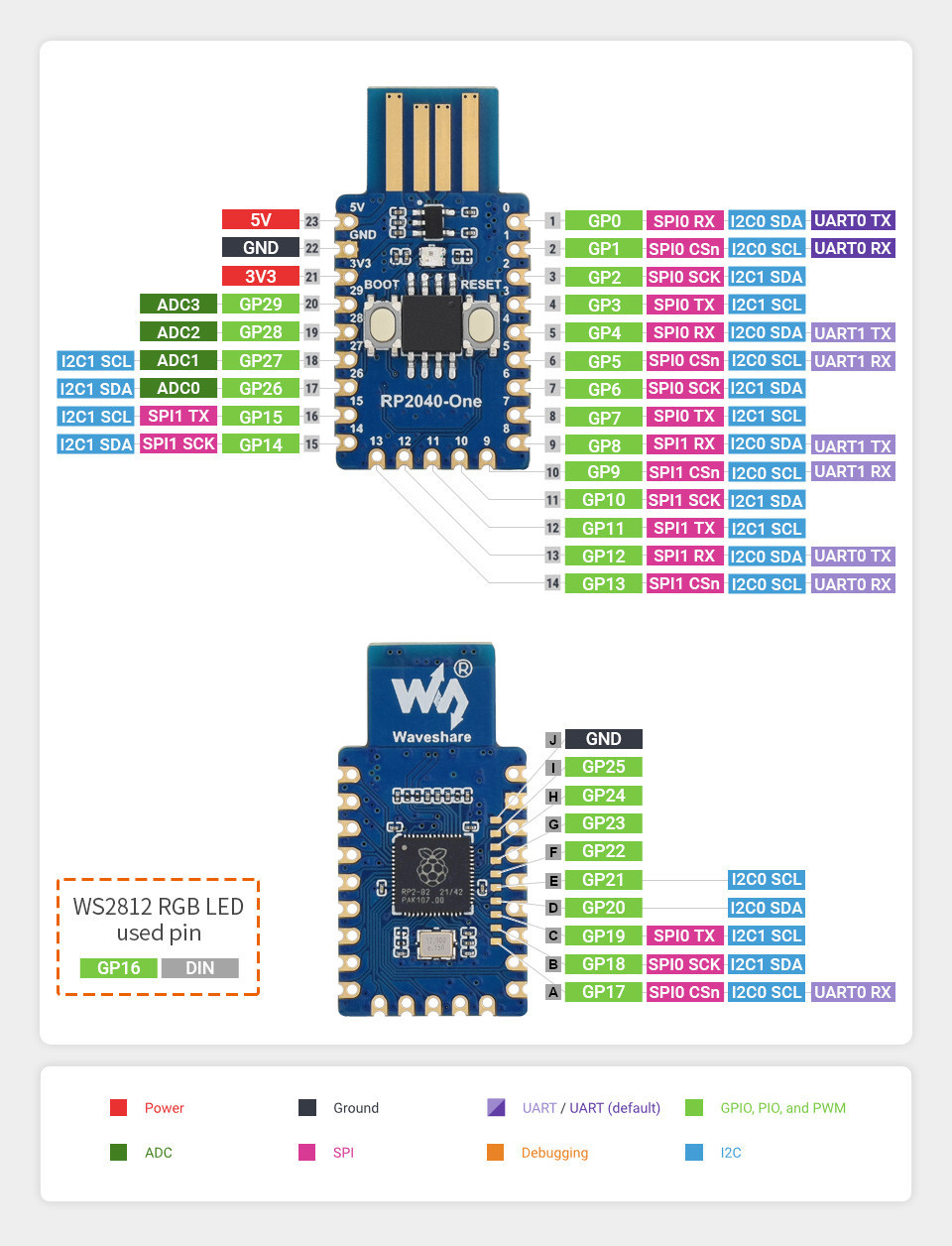
External pin mapping on the RP2040-One is not identical to the original Raspberry Pi Pico board. Almost all pins are rearranged in a more compact order. Likewise, the voltage sense and monitoring functions are not integrated. Thus all internal R2040 GPIO lines are available for free use, insofar there is sufficient space for them on the outer edge of the board or on the bottom side by additional solder points.
Only GPIO line 16 is exclusively routed to the on-board user RGB LED. The analog voltage reference is internally hard-wired to the digital 3.3V power supply and only decoupled by a simple resistor. There is no option to change this from outside the board.
Pin Mapping |
Pinout |
Default Zephyr Peripheral Mapping
Devicetree compatible |
|
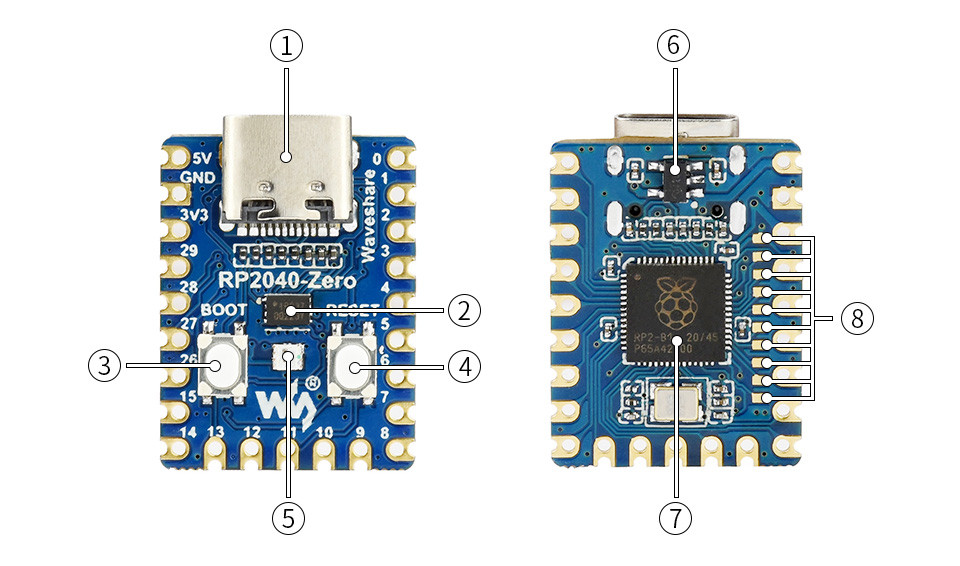
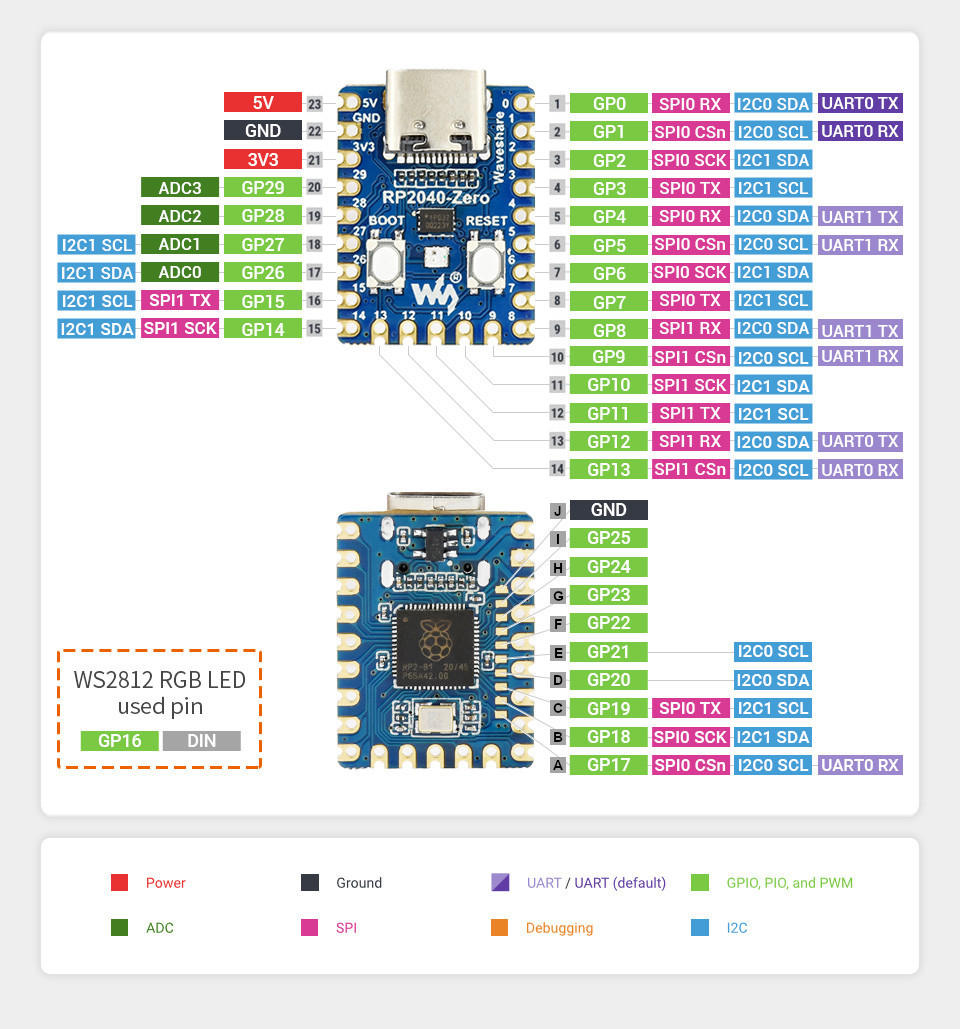
External pin mapping on the RP2040-Zero is not identical to the original Raspberry Pi Pico board. Almost all pins are rearranged in a more compact order. Likewise, the voltage sense and monitoring functions are not integrated. Thus all internal R2040 GPIO lines are available for free use, insofar there is sufficient space for them on the outer edge of the board or on the bottom side by additional solder points.
Only GPIO line 16 is exclusively routed to the on-board user RGB LED. The analog voltage reference is internally hard-wired to the digital 3.3V power supply and only decoupled by a simple resistor. There is no option to change this from outside the board.
Pin Mapping |
Pinout |
Default Zephyr Peripheral Mapping
Devicetree compatible |
|
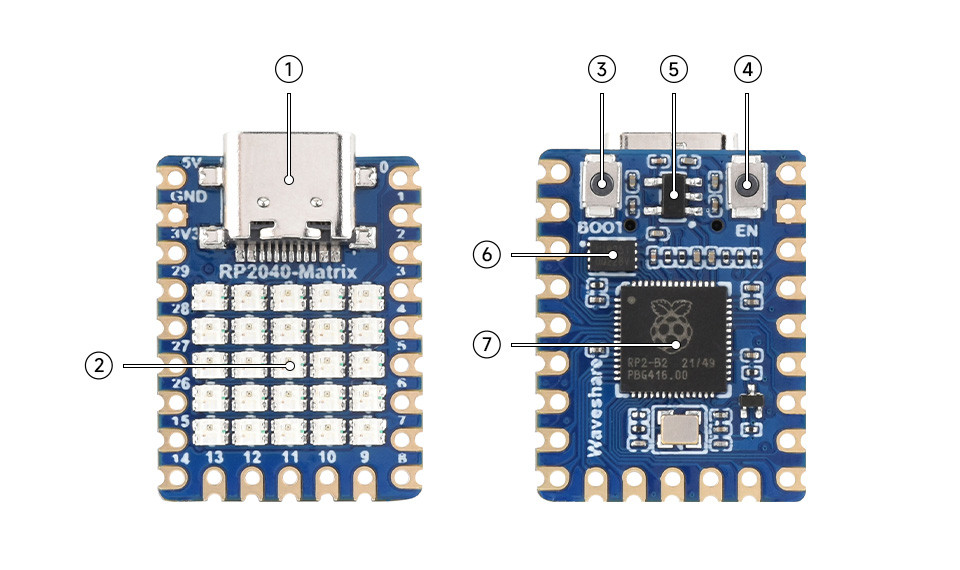
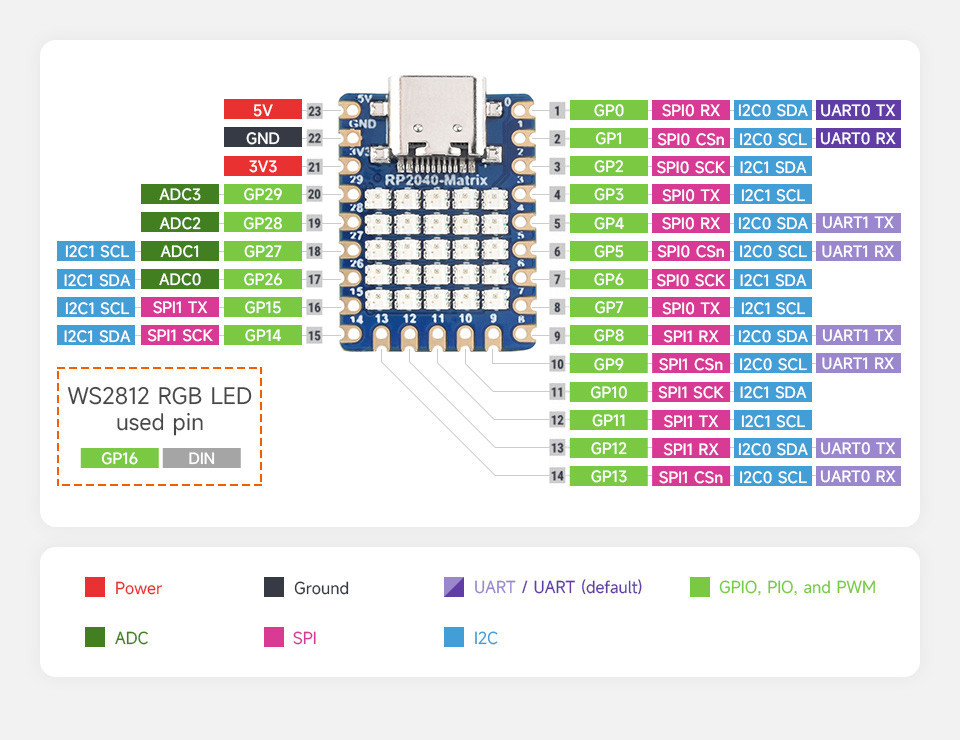
External pin mapping on the RP2040-Matrix is not identical to the original Raspberry Pi Pico board. Almost all pins are rearranged in a more compact order. Likewise, the voltage sense and monitoring functions are not integrated. Thus all internal R2040 GPIO lines are available for free use, insofar there is sufficient space for them on the outer edge of the board.
Only GPIO line 16 is exclusively routed to the on-board user 5×5 RGB LED array. The analog voltage reference is internally hard-wired to the digital 3.3V power supply and only decoupled by a simple resistor. There is no option to change this from outside the board.
Pin Mapping |
Pinout |
Default Zephyr Peripheral Mapping
Devicetree compatible |
|
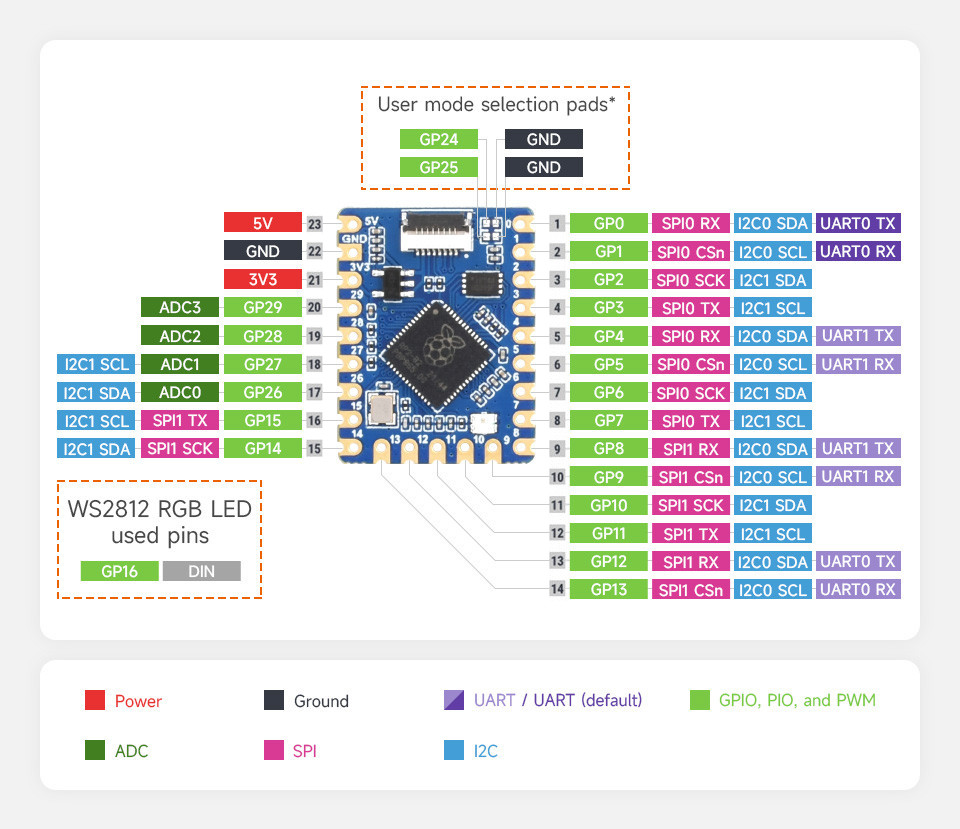
External pin mapping on the RP2040-Tiny is not identical to the original Raspberry Pi Pico board. Almost all pins are rearranged in a more compact order. Likewise, the voltage sense and monitoring functions are not integrated. Thus all internal R2040 GPIO lines are available for free use, insofar there is sufficient space for them on the outer edge of the board.
Only GPIO line 16 is exclusively routed to the on-board user RGB LED. The analog voltage reference is internally hard-wired to the digital 3.3V power supply and only decoupled by a simple resistor. There is no option to change this from outside the board.
Pin Mapping |
Pinout |
Default Zephyr Peripheral Mapping
Devicetree compatible |
|
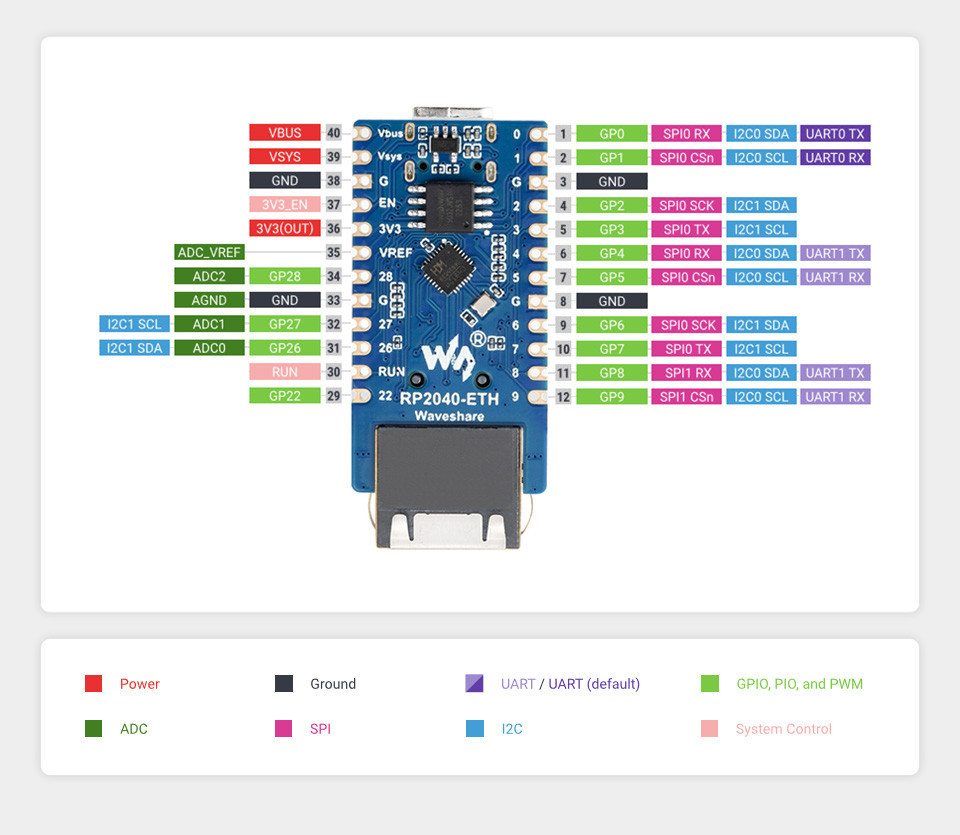
External pin mapping on the RP2040-ETH is only partially identical to the original Raspberry Pi Pico board. About half of the pins provided on the edge were skipped for internal on-board purposes.
Note that also internal signals are not wired in same way. The internal RP2040 GPIO line 23 is not routed to the voltage regulator for SMPS power saving modes, due to the lack of such kind of functionality on applied SMPS (ME6217). Also the internal RP2040 GPIO line 29 (instead of 24 as in other one to one clones) is routed to the USB connector for USB VBUS monitoring. This omits the logical sensing of the USB bus voltage and also the monitoring of the system voltage, but it replaces it by combining the two original functions on line 29, now for USB VBUS.
But the GPIO line 25 is routed to the on-board user RGB LED in expected manner. In addition, GPIO lines 17 to 20 are used for control and UART communication with the on-board Ethernet controller that integrates an embedded but complete TCP/IP stack (incl. UDP, ICMP, IGMP, ARP).
Pin Mapping |
Pinout |
Default Zephyr Peripheral Mapping
Devicetree compatible |
|
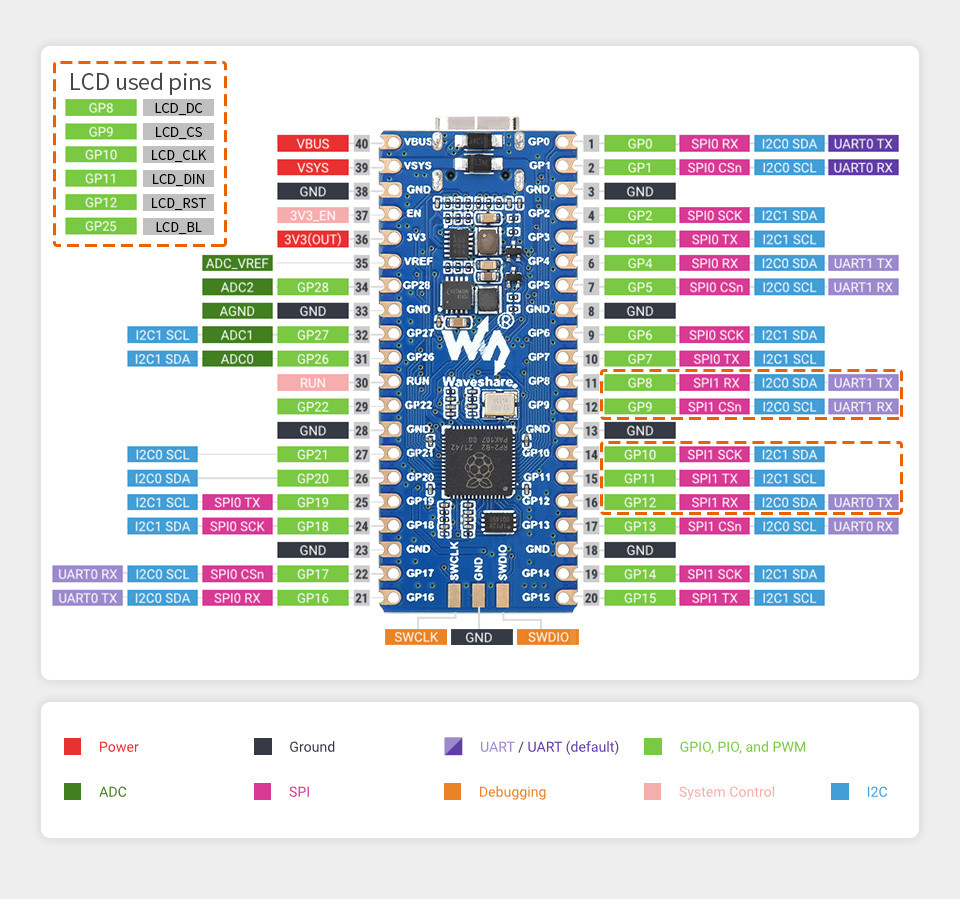
External pin mapping on the RP2040-LCD-0.96 is identical to the original Raspberry Pi Pico board, but note that internal RP2040 GPIO lines 23 and 24 are routed to the voltage regulator and USB connector for SMPS (TPS63000) power saving modes and USB VBUS sense. GPIO line 25 is routed to the on-board user LCD backlight and GPIO line 29 will be used for VSYS/3 voltage monitoring per default.
In addition, GPIO lines 8 to 12 are used for control and SPI communication with the on-board LCD, but are still available externally in parallel.
Pin Mapping |
Pinout |
Default Zephyr Peripheral Mapping
Devicetree compatible |
|
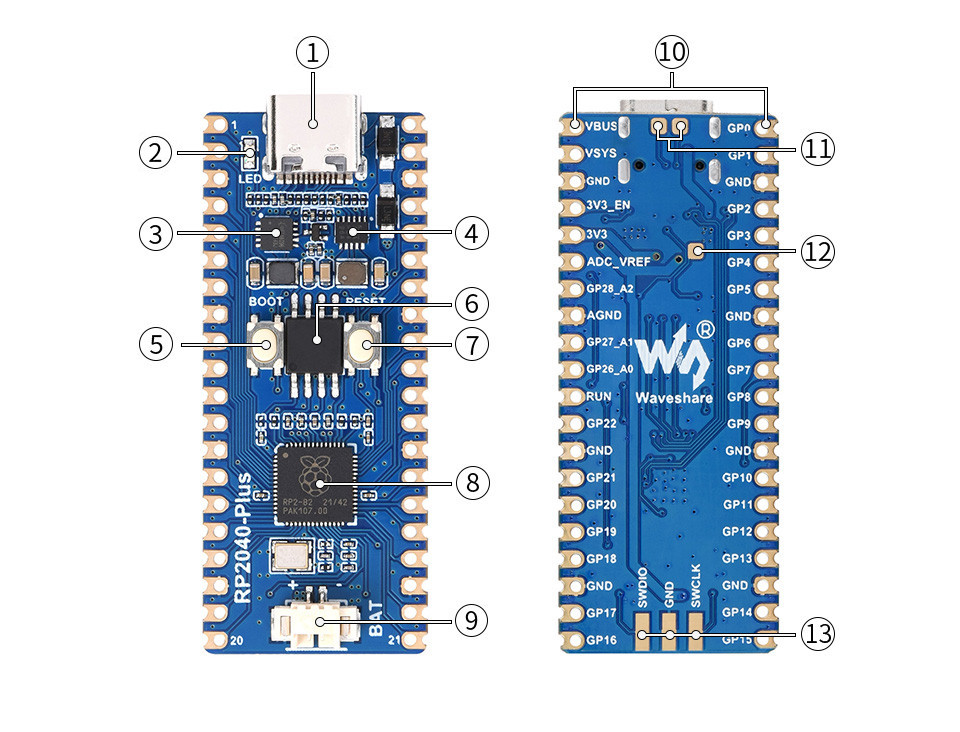
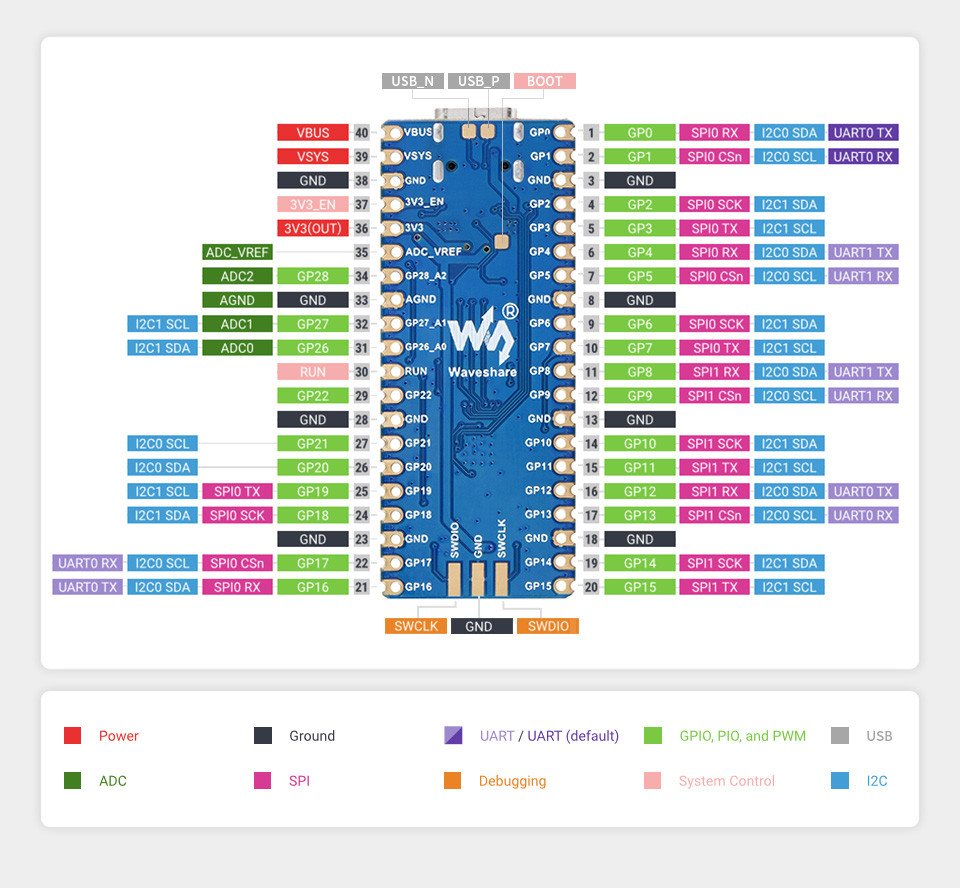
External pin mapping on the RP2040-Plus is identical to the original Raspberry Pi Pico board, but note that internal RP2040 GPIO lines 23 and 24 are routed to the voltage regulator and USB connector for SMPS (TPS63000) power saving modes and USB VBUS sense. GPIO line 25 is routed to the on-board user LED and GPIO line 29 will be used for VSYS/3 voltage monitoring per default.
Pin Mapping |
Pinout |
Default Zephyr Peripheral Mapping
Devicetree compatible |
|
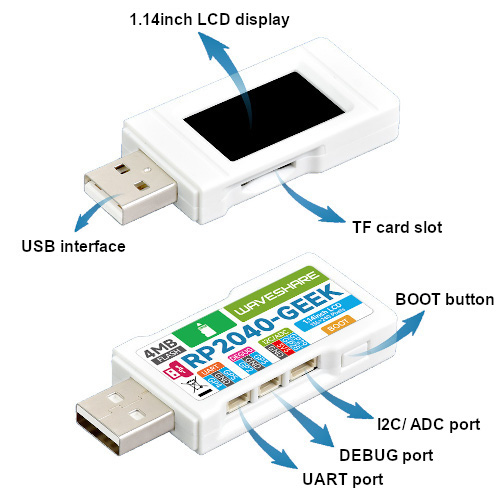
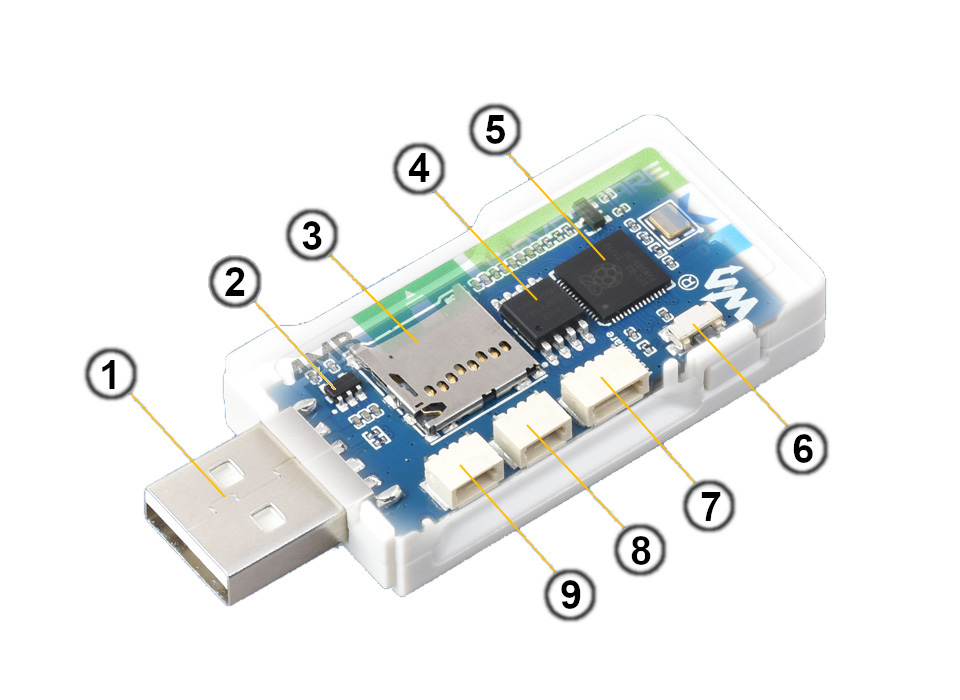
External pin mapping on the RP2040-Geek is compatible to the original Raspberry Pi Debug Probe [8], but not identical. One additional edge connector provides two special IO pins for target board testing (I2C or ADC in default). There is no SPI bus on any edge connector. These are used internally to connect the on-board LCD and TF card slots.
Pin Mapping |
Pinout |
Default Zephyr Peripheral Mapping
Devicetree compatible |
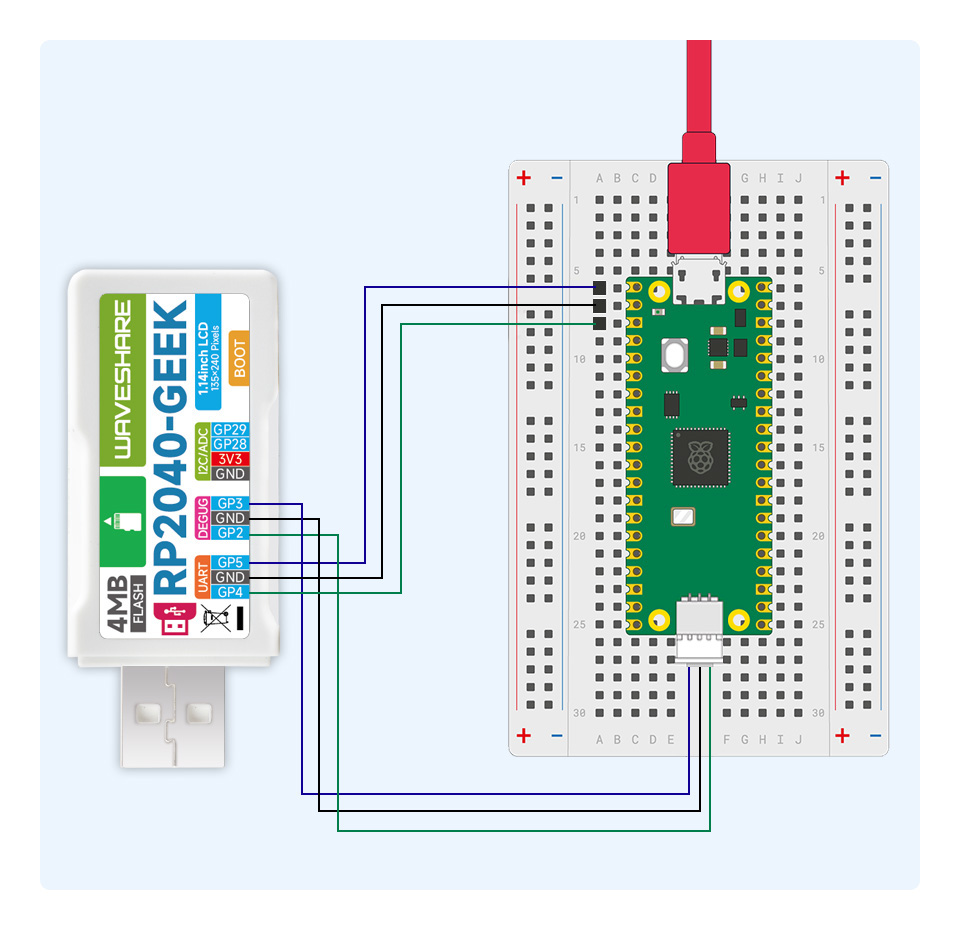
Example as Picoprobe USB-to-SWD and UART bridge. |
Supported Features
Similar to the Raspberry Pi Pico the Waveshare RP2040 board configuration supports the following hardware features:
Peripheral |
Kconfig option |
Devicetree compatible |
Zephyr API |
|---|---|---|---|
PINCTRL |
|||
GPIO |
|||
UART |
|||
UDC (USB Device Controller) |
|||
I2C |
|||
SPI |
|||
PWM |
|||
ADC |
|||
Temperature (Sensor) |
|||
RTC |
|||
Timer (Counter) |
|||
Watchdog Timer (WDT) |
|||
Flash |
|||
PIO |
N/A |
||
UART (PIO) |
|||
SPI (PIO) |
|||
DMA |
|||
HWINFO |
N/A |
||
VREG |
|||
RESET |
|||
CLOCK |
|||
NVIC |
N/A |
Nested Vector Interrupts Controller |
|
SYSTICK |
N/A |
Other hardware features are not currently supported by Zephyr. The default configuration can be found in the different Kconfig files:
Board Configurations
The Waveshare RP2040 boards can be configured for the following different use cases. The RP2040-Plus board offers an assembly option with 16㎆ Flash, which is mapped as a hardware revision.
west build -b waveshare_rp2040_one
Use the serial port UART0 on edge header as Zephyr console and for the shell.
west build -b waveshare_rp2040_one -S usb-console
Use the native USB device port with CDC-ACM as Zephyr console and for the shell.
west build -b waveshare_rp2040_zero
Use the serial port UART0 on edge header as Zephyr console and for the shell.
west build -b waveshare_rp2040_zero -S usb-console
Use the native USB device port with CDC-ACM as Zephyr console and for the shell.
west build -b waveshare_rp2040_matrix
Use the serial port UART0 on edge header as Zephyr console and for the shell.
west build -b waveshare_rp2040_matrix -S usb-console
Use the native USB device port with CDC-ACM as Zephyr console and for the shell.
west build -b waveshare_rp2040_tiny
Use the serial port UART0 on edge header as Zephyr console and for the shell.
west build -b waveshare_rp2040_tiny -S usb-console
Use the native USB device port with CDC-ACM as Zephyr console and for the shell.
west build -b waveshare_rp2040_eth
Use the serial port UART0 on edge header as Zephyr console and for the shell.
west build -b waveshare_rp2040_eth -S usb-console
Use the native USB device port with CDC-ACM as Zephyr console and for the shell.
west build -b waveshare_rp2040_lcd_0_96
Use the serial port UART0 on edge header as Zephyr console and for the shell.
west build -b waveshare_rp2040_lcd_0_96 -S usb-console
Use the native USB device port with CDC-ACM as Zephyr console and for the shell.
west build -b waveshare_rp2040_plus
Use the serial port UART0 on edge header as Zephyr console and for the shell.
west build -b waveshare_rp2040_plus -S usb-console
Use the native USB device port with CDC-ACM as Zephyr console and for the shell.
west build -b waveshare_rp2040_plus@16mb
Setup QSPI Flash controller to work with 16㎆ and use the serial port UART0 on edge header as Zephyr console and for the shell.
west build -b waveshare_rp2040_plus@16mb -S usb-console
Setup QSPI Flash controller to work with 16㎆ and use the native USB device port with CDC-ACM as Zephyr console and for the shell.
west build -b waveshare_rp2040_geek
Use the serial port UART1 on edge header as Zephyr console and for the shell.
west build -b waveshare_rp2040_geek -S usb-console
Use the native USB device port with CDC-ACM as Zephyr console and for the shell.
Connections and IOs
The Waveshare wiki [13] has detailed information about board connections. Download the different schematics or datasheets as linked above per board for more details. The pinout diagrams can also be found there.
System Clock
The RP2040 [75] MCU is configured to use the 12㎒ external crystal with the on-chip PLL generating the 125㎒ system clock. The internal AHB and APB units are set up in the same way as the upstream Raspberry Pi Pico C/C++ SDK [4] libraries.
GPIO (PWM) Ports
The RP2040 [75] MCU has 1 GPIO cell which covers all I/O pads and
8 PWM function unit each with 2 channels beside a dedicated Timer unit. On
the two boards RP2040-Plus and RP2040-LCD-0.96, PWM4 channel B is available
on the on-board user or backlight LED. But the PWM operation is not enable by
default. Only if CONFIG_PWM_RPI_PICO is enabled then the
first user or backlight LED is driven by PWM4CHB instead of by GPIO. All
channels of PWM0 until PWM7 are available on the Raspberry Pi Pico or
Waveshare RP2040 Mini header and Waveshare RP2040 Mini PCB Pads.
The RP2040-Geek board has no such LED and no standard header and therefore does not provide any PWM to the outside on any pad by default.
ADC/TS Ports
The RP2040 [75] MCU has 1 ADC with 4 channels and an additional
fifth channel for the on-chip temperature sensor (TS). The ADC channels 0-2
are available on the Raspberry Pi Pico or Waveshare RP2040 Mini header,
channel 3 only on the Waveshare RP2040 Mini header. On the RP2040-Plus,
the RP2040-LCD-0.96 and RP2040-ETH, ADC channel 3 will be used for
internal on-board voltage monitoring.
The external voltage reference ADC_VREF can be used optional for the ADC
and is only available on the Raspberry Pi Pico header.
The RP2040-Geek board provides ADC channel 2 and 3 over GP28 (ADC2) and GP29 (ADC3) on one of the three edge connectors but these are disabled by default. Both ADC channels will share the same lines with the I2C0 signals.
SPI Port
The RP2040 [75] MCU has 2 SPIs. To the edge connectors SPI0 is
connect to external devices over GP19 (MOSI), GP16 (MISO), GP18 (SCK), and
GP17 (CSn) on the Raspberry Pi Pico header or over GP7 (MOSI), GP4 (MISO),
GP6 (SCK), and GP5 (CSn) on the Waveshare RP2040 Mini header. A special
case is the RP2040-ETH board where SPI0 is routed on the Raspberry Pi Pico
header with the same GP4-7 layout as on the Waveshare RP2040 Mini header.
The RP2040-Geek does not provide any SPI to the outside on any pad. These are connected internally to the LCD and the TF/microSD card interfaces.
I2C Port
The RP2040 [75] MCU has 2 I2Cs. To the edge connectors I2C0 and
I2C1 is connect to external devices over GP4 (I2C0_SDA), GP5 (I2C0_SCL),
GP14 (I2C1_SDA), and GP15 (I2C1_SCL) on the Raspberry Pi Pico header or
over GP8 (I2C0_SDA), GP9 (I2C0_SCL), GP14 (I2C1_SDA), and GP15 (I2C1_SCL)
on the Waveshare RP2040 Mini header. A special case is the RP2040-ETH
board where I2C1 is omitted and I2C0 is routed on the Raspberry Pi Pico
header with the same GP8-9 layout as on the Waveshare RP2040 Mini header.
The RP2040-Geek board provides I2C0 over GP28 (SDA) and GP29 (SCL) on one of the three edge connectors and it is enabled by default. Both I2C0 signals will share the same lines with ADC channels 2 and 3.
Serial Port
The RP2040 [75] MCU has 2 UARTs. One of the UARTs (UART0) is
connected to external devices over GP0 (TX) and GP1 (RX) on both the
Raspberry Pi Pico and the Waveshare RP2040 Mini header in same manner
and is the Zephyr console.
The RP2040-Geek board provides UART1 over GP4 (TX) and GP5 (RX) on one of the three edge connectors and it is enabled by default.
USB Device Port
The RP2040 [75] MCU has a (native) USB device port that can be used to communicate with a host PC. See the USB device support sample applications for more, such as the USB CDC-ACM sample which sets up a virtual serial port that echos characters back to the host PC. As an alternative to the default Zephyr console on serial port the Bridle USB Console Snippet (usb-console) can be used to enable CDC ACM and switch the console to USB
USB device idVendor=2e8a, idProduct=000a, bcdDevice= 4.02
USB device strings: Mfr=1, Product=2, SerialNumber=3
Product: RP2040-One (CDC ACM)
Manufacturer: Waveshare (Raspberry Pi)
SerialNumber: B69F8448A6E91514
USB device idVendor=2e8a, idProduct=000a, bcdDevice= 4.02
USB device strings: Mfr=1, Product=2, SerialNumber=3
Product: RP2040-Zero (CDC ACM)
Manufacturer: Waveshare (Raspberry Pi)
SerialNumber: B69F8448A6E91514
USB device idVendor=2e8a, idProduct=000a, bcdDevice= 4.02
USB device strings: Mfr=1, Product=2, SerialNumber=3
Product: RP2040-Matrix (CDC ACM)
Manufacturer: Waveshare (Raspberry Pi)
SerialNumber: B69F8448A6E91514
USB device idVendor=2e8a, idProduct=000a, bcdDevice= 4.02
USB device strings: Mfr=1, Product=2, SerialNumber=3
Product: RP2040-Tiny (CDC ACM)
Manufacturer: Waveshare (Raspberry Pi)
SerialNumber: B69F8448A6E91514
USB device idVendor=2e8a, idProduct=000a, bcdDevice= 4.02
USB device strings: Mfr=1, Product=2, SerialNumber=3
Product: RP2040-ETH (CDC ACM)
Manufacturer: Waveshare (Raspberry Pi)
SerialNumber: B69F8448A6E91514
USB device idVendor=2e8a, idProduct=000a, bcdDevice= 4.02
USB device strings: Mfr=1, Product=2, SerialNumber=3
Product: RP2040-LCD-0.96 (CDC ACM)
Manufacturer: Waveshare (Raspberry Pi)
SerialNumber: B69F8448A6E91514
USB device idVendor=2e8a, idProduct=000a, bcdDevice= 4.02
USB device strings: Mfr=1, Product=2, SerialNumber=3
Product: RP2040-Plus (CDC ACM)
Manufacturer: Waveshare (Raspberry Pi)
SerialNumber: B69F8448A6E91514
USB device idVendor=2e8a, idProduct=000a, bcdDevice= 4.02
USB device strings: Mfr=1, Product=2, SerialNumber=3
Product: RP2040-Geek (CDC ACM)
Manufacturer: Waveshare (Raspberry Pi)
SerialNumber: B69F8448A6E91514
To integrate specific USB device functions that do not follow a USB standard class, the following alternate identifier numbers are available for the various Waveshare RP2040 and RP2350 boards according to the Raspberry Pi USB product ID list [2]:
RP2040
0x101F:0x1020:0x1021:0x1039:RP2040-LCD-1.28
0x103A:0x1044:Power Management HAT (B)
0x1055:0x1056:0x1057:RP2040-Touch-LCD-1.28
0x1083:RP2040-PiZero
0x1084:0x1085:0x1086:RP2040-BLE
0x1087:PICO-Cam-A
RP2350
0x10B0:RP2350-Zero
0x10B1:RP2350-Plus
0x10B2:RP2350-Tiny
0x10B3:RP2350-LCD-1.28
0x10B4:RP2350-Touch-LCD-1.28
0x10B5:RP2350-One
0x10B6:RP2350-Geek
0x10B7:RP2350-LCD-0.96
Programmable I/O (PIO)
The RP2040 SoC [75] comes with two PIO periherals. These are two simple co-processors that are designed for I/O operations. The PIOs run a custom instruction set, generated from a custom assembly language. PIO programs are assembled using pioasm, a tool provided by Raspberry Pi. Further information can be found in the Raspberry Pi Pico C/C++ SDK [4] document, section with title “Using PIOASM, the PIO Assembler”.
Zephyr does not (currently) assemble PIO programs. Rather, they should be manually assembled and embedded in source code. An example of how this is done can be found at drivers/serial/uart_rpi_pico_pio.c or drivers/spi/spi_rpi_pico_pio.c.
Programming and Debugging
Flashing
Using UF2
If you don’t have an SWD adapter, you can flash the Waveshare RP2040 boards
with a UF2 file. By default, building an app for this board will generate a
build/zephyr/zephyr.uf2 file. If the board is powered on with the
BOOTSEL button pressed, it will appear on the host as a mass
storage device:
USB device idVendor=2e8a, idProduct=0003, bcdDevice= 1.00
USB device strings: Mfr=1, Product=2, SerialNumber=0
Product: RP2 Boot
Manufacturer: Raspberry Pi
SerialNumber: E0C9125B0D9B
The UF2 file should be drag-and-dropped or copied on command line to the device, which will then flash the Waveshare RP2040 board.
Each RP2040 SoC [75] ships the UF2 compatible [1] bootloader pico-bootrom [6], a native support in silicon. The full source for the RP2040 bootrom at pico-bootrom [6] includes versions 1, 2 and 3 of the bootrom, which correspond to the B0, B1 and B2 silicon revisions, respectively.
Note that every time you build a program for the RP2040, the Pico SDK selects
an appropriate second stage bootloader based on what kind of external QSPI
Flash type the board configuration you are building for was giving. There
are several versions of boot2 [5] for different flash chips, and each one is
exactly 256 bytes of code which is put right at the start of the eventual
program binary. On Zephyr the boot2 versions are part of the
Raspberry Pi Pico HAL [12] module. Possible selections:
CONFIG_RP2_FLASH_AT25SF128A:CONFIG_RP2_FLASH_GENERIC_03H:CONFIG_RP2_FLASH_IS25LP080:CONFIG_RP2_FLASH_W25Q080:CONFIG_RP2_FLASH_W25X10CL:
All Waveshare RP2040 boards set this option to CONFIG_RP2_FLASH_W25Q080.
Further information can be found in the RP2040 Datasheet [76], sections with
title “Bootrom” and “Processor Controlled Boot Sequence”
or Brian Starkey’s Blog article Pico serial bootloader [11]
Using SEGGER JLink
You can flash the Waveshare RP2040 boards with a SEGGER JLink debug probe as described in Building, Flashing and Debugging.
Here is an example of building and flashing the Blinky application.
west build -b waveshare_rp2040_plus -p -d build/waveshare_rp2040 zephyr/samples/basic/blinky
west flash -r jlink -d build/waveshare_rp2040
Using OpenOCD
To use PicoProbe [7] or Raspberry Pi Debug Probe [8], you must configure
udev. Create a file in /etc/udev.rules.d with any name,
and write the line below:
ATTRS{idVendor}=="2e8a", ATTRS{idProduct}=="0004", MODE="660", GROUP="plugdev", TAG+="uaccess"
ATTRS{idVendor}=="2e8a", ATTRS{idProduct}=="000c", MODE="660", GROUP="plugdev", TAG+="uaccess"
This example is valid for the case that the user joins to plugdev
groups.
The RP2040-LCD-0.96 and RP2040-Plus has an SWD interface that can be used to program and debug the on board RP2040. This interface can be utilized by OpenOCD. To use it with the RP2040, OpenOCD version 0.12.0 or later is needed. If you are using a Debian based system (including RaspberryPi OS, Ubuntu, and more), using the pico_setup.sh [10] script is a convenient way to set up the forked version of OpenOCD. Depending on the interface used (such as JLink), you might need to checkout to a branch that supports this interface, before proceeding. Build and install OpenOCD as described in the README.
Here is an example of building and flashing the Blinky application.
west build -b waveshare_rp2040_plus -p -d build/waveshare_rp2040 zephyr/samples/basic/blinky -- \
-DOPENOCD=/usr/local/bin/openocd \
-DOPENOCD_DEFAULT_PATH=/usr/local/share/openocd/scripts \
-DWAVESHARE_RP2040_DEBUG_ADAPTER=picoprobe
west flash -r openocd -d build/waveshare_rp2040
Set the environment variables OPENOCD to
/usr/local/bin/openocd and OPENOCD_DEFAULT_PATH to
/usr/local/share/openocd/scripts. This should work with the OpenOCD
that was installed with the default configuration. This configuration also
works with an environment that is set up by the pico_setup.sh [10] script.
WAVESHARE_RP2040_DEBUG_ADAPTER specifies what debug adapter is
used for debugging. If WAVESHARE_RP2040_DEBUG_ADAPTER was not
assigned, cmsis-dap is used by default. The other supported adapters
are picoprobe, raspberrypi-swd, jlink and
blackmagicprobe. How to connect picoprobe and
raspberrypi-swd is described in Getting Started Guide with Raspberry
Pi Pico [3]. Any other SWD debug adapter maybe also work with this configuration.
The value of WAVESHARE_RP2040_DEBUG_ADAPTER is cached, so it can
be omitted from west flash and west debug if it was
previously set while running west build.
WAVESHARE_RP2040_DEBUG_ADAPTER is used in an argument to OpenOCD as
"source [find interface/${WAVESHARE_RP2040_DEBUG_ADAPTER}.cfg]". Thus,
WAVESHARE_RP2040_DEBUG_ADAPTER needs to be assigned the file name of
the debug adapter.
You can also flash the board with the following command that directly calls OpenOCD (assuming a SEGGER JLink adapter is used):
$ openocd -f interface/jlink.cfg    \
          -c 'transport select swd' \
          -f target/rp2040.cfg      \
          -c "adapter speed 2000"   \
          -c 'targets rp2040.core0' \
          -c 'program path/to/zephyr.elf verify reset exit'
Debugging
The SWD interface can also be used to debug the board. To achieve this, you can either use SEGGER JLink or OpenOCD.
Using SEGGER JLink
Use a SEGGER JLink debug probe and follow the instruction in Building, Flashing and Debugging.
Using OpenOCD
Install OpenOCD as described for flashing the board.
Here is an example for debugging the Blinky application.
west build -b waveshare_rp2040_plus -p -d build/waveshare_rp2040 zephyr/samples/basic/blinky -- \
-DOPENOCD=/usr/local/bin/openocd \
-DOPENOCD_DEFAULT_PATH=/usr/local/share/openocd/scripts \
-DWAVESHARE_RP2040_DEBUG_ADAPTER=raspberrypi-swd
west debug -d build/waveshare_rp2040
As with flashing, you can specify the debug adapter by specifying WAVESHARE_RP2040_DEBUG_ADAPTER at west build time. No needs to specify it at west debug time.
You can also debug with OpenOCD and gdb launching from command-line. Run the following command:
$ openocd -f interface/jlink.cfg    \
          -c 'transport select swd' \
          -f target/rp2040.cfg      \
          -c "adapter speed 2000"   \
          -c 'targets rp2040.core0'
On another terminal, run:
$ gdb-multiarch
Inside gdb, run:
(gdb) tar ext :3333
(gdb) file path/to/zephyr.elf
You can then start debugging the board.
More Samples
LED Blinky and Fade
WS2812 LED Test Pattern by PIO
See also Zephyr sample: LED strip.
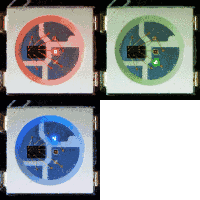
west build -b waveshare_rp2040_one -p -d build/waveshare_rp2040 zephyr/samples/drivers/led/led_strip
west flash -r uf2 -d build/waveshare_rp2040
Hint
Neither LED Blinky nor LED Fade can be built and executed on RP2040-One, because this system has only one digital RGB LED. A simple GPIO or PWM control is not possible!
WS2812 LED Test Pattern by PIO
See also Zephyr sample: LED strip.
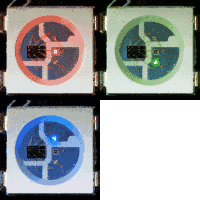
west build -b waveshare_rp2040_zero -p -d build/waveshare_rp2040 zephyr/samples/drivers/led/led_strip
west flash -r uf2 -d build/waveshare_rp2040
Hint
Neither LED Blinky nor LED Fade can be built and executed on RP2040-Zero, because this system has only one digital RGB LED. A simple GPIO or PWM control is not possible!
WS2812 LED Test Pattern by PIO
See also Zephyr sample: LED strip.
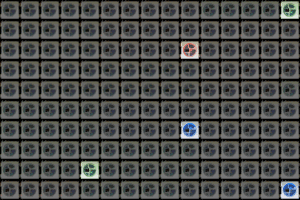
west build -b waveshare_rp2040_matrix -p -d build/waveshare_rp2040 zephyr/samples/drivers/led/led_strip
west flash -r uf2 -d build/waveshare_rp2040
Hint
Neither LED Blinky nor LED Fade can be built and executed on RP2040-Matrix, because this system has only one digital RGB LED. A simple GPIO or PWM control is not possible!
WS2812 LED Test Pattern by PIO
See also Zephyr sample: LED strip.
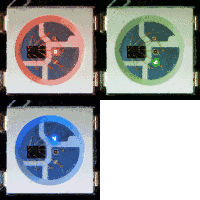
west build -b waveshare_rp2040_tiny -p -d build/waveshare_rp2040 zephyr/samples/drivers/led/led_strip
west flash -r uf2 -d build/waveshare_rp2040
Hint
Neither LED Blinky nor LED Fade can be built and executed on RP2040-Tiny, because this system has only one digital RGB LED. A simple GPIO or PWM control is not possible!
WS2812 LED Test Pattern by PIO
See also Zephyr sample: LED strip.
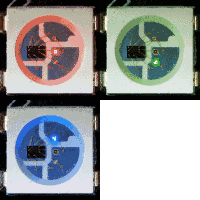
west build -b waveshare_rp2040_eth -p -d build/waveshare_rp2040 zephyr/samples/drivers/led/led_strip
west flash -r uf2 -d build/waveshare_rp2040
Hint
Neither LED Blinky nor LED Fade can be built and executed on RP2040-ETH, because this system has only one digital RGB LED. A simple GPIO or PWM control is not possible!
LCD Backlight LED Blinky by GPIO
See also Zephyr sample: Blinky.
west build -b waveshare_rp2040_lcd_0_96 -p -d build/waveshare_rp2040 zephyr/samples/basic/blinky
west flash -r uf2 -d build/waveshare_rp2040
LCD Backlight LED Blinky by PWM
See also Zephyr sample: PWM Blinky.
west build -b waveshare_rp2040_lcd_0_96 -p -d build/waveshare_rp2040 zephyr/samples/basic/blinky_pwm
west flash -r uf2 -d build/waveshare_rp2040
LCD Backlight LED Fade by PWM
See also Zephyr sample: Fade LED.
west build -b waveshare_rp2040_lcd_0_96 -p -d build/waveshare_rp2040 zephyr/samples/basic/fade_led
west flash -r uf2 -d build/waveshare_rp2040
Green User LED Blinky by GPIO
See also Zephyr sample: Blinky.
west build -b waveshare_rp2040_plus -p -d build/waveshare_rp2040 zephyr/samples/basic/blinky
west flash -r uf2 -d build/waveshare_rp2040
Green User LED Blinky by PWM
See also Zephyr sample: PWM Blinky.
west build -b waveshare_rp2040_plus -p -d build/waveshare_rp2040 zephyr/samples/basic/blinky_pwm
west flash -r uf2 -d build/waveshare_rp2040
Green User LED Fade by PWM
See also Zephyr sample: Fade LED.
west build -b waveshare_rp2040_plus -p -d build/waveshare_rp2040 zephyr/samples/basic/fade_led
west flash -r uf2 -d build/waveshare_rp2040
Hint
Neither LED Blinky nor LED Fade can be built and executed on RP2040-Geek, because this system has no user LED. A simple GPIO or PWM control is not possible by default!
But with the help of the dedicated Loopback wiring for tests shield, all necessary Devicetree changes and board extensions are carried out temporarily in order to be able to execute the standard examples. This assumes the external wiring as shown below (right).
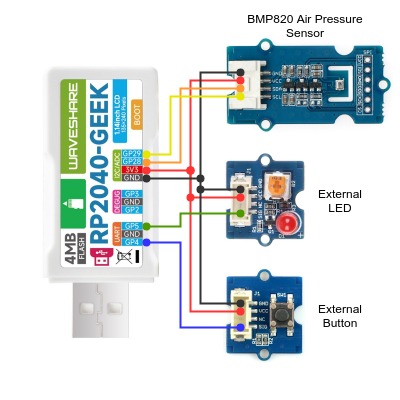
External LED Blinky by GPIO
See also Zephyr sample: Blinky.
west build -b waveshare_rp2040_geek -p --shield loopback_test -d build/waveshare_rp2040 zephyr/samples/basic/blinky
west flash -r uf2 -d build/waveshare_rp2040
External LED Blinky by PWM
See also Zephyr sample: PWM Blinky.
west build -b waveshare_rp2040_geek -p --shield loopback_test -d build/waveshare_rp2040 zephyr/samples/basic/blinky_pwm
west flash -r uf2 -d build/waveshare_rp2040
External LED Fade by PWM
See also Zephyr sample: Fade LED.
west build -b waveshare_rp2040_geek -p --shield loopback_test -d build/waveshare_rp2040 zephyr/samples/basic/fade_led
west flash -r uf2 -d build/waveshare_rp2040
External LED Switch ON/OFF by External Button
See also Zephyr sample: Button.
west build -b waveshare_rp2040_geek -p --shield loopback_test -d build/waveshare_rp2040 zephyr/samples/basic/button
west flash -r uf2 -d build/waveshare_rp2040
Hello Shell with USB-CDC/ACM Console
Hello Shell
west build -b waveshare_rp2040_one -p -S usb-console -d build/waveshare_rp2040 bridle/samples/helloshell
west flash -r uf2 -d build/waveshare_rp2040
Simple test execution on target
(text in bold is a command input)
uart:~$ hello -h
hello - say hello
uart:~$ hello
Hello from shell.
uart:~$ hwinfo devid
Length: 8
ID: 0x8be83cbec052feae

uart:~$ kernel version
Zephyr version 4.2.2

uart:~$ bridle version
Bridle version 4.2.2

uart:~$ bridle version long
Bridle version 4.2.2.0

uart:~$ bridle info
Zephyr: 4.2.2
Bridle: 4.2.2
uart:~$ device list
devices:
- clock-controller@40008000 (READY)
  DT node labels: clocks
- reset-controller@4000c000 (READY)
  DT node labels: reset
- snippet_cdc_acm_console_uart (READY)
  DT node labels: snippet_cdc_acm_console_uart
- uart@40034000 (READY)
  DT node labels: uart0 rp2040mini_serial
- timer@40054000 (READY)
  DT node labels: timer
- pio@50200000 (READY)
  DT node labels: ((pio_hw_t *)0x50200000u)
- gpio@40014000 (READY)
  DT node labels: gpio0
- adc@4004c000 (READY)
  DT node labels: adc
- flash-controller@18000000 (READY)
  DT node labels: ssi
- i2c@40044000 (READY)
  DT node labels: i2c0 rp2040mini_i2c
- vreg@40064000 (READY)
  DT node labels: vreg
- dietemp (READY)
  DT node labels: die_temp
uart:~$ history
[  0] history
[  1] device list
[  2] bridle info
[  3] bridle version long
[  4] bridle version
[  5] kernel version
[  6] hwinfo devid
[  7] hello
[  8] hello -h
Operate with the on-chip voltage regulator unit:
uart:~$ regulator vlist vreg@40064000
0.800 V
0.850 V
0.900 V
0.950 V
1.000 V
1.050 V
1.100 V
1.150 V
1.200 V
1.250 V
1.300 V
Trigger a power-of/on sequence:
uart:~$ hwinfo reset_cause
reset caused by:
- pin

uart:~$ regulator disable vreg@40064000
*** Booting Zephyr OS build v4.2.2… (delayed boot 4000ms) ***
Hello World! I'm THE SHELL from waveshare_rp2040_one
uart:~$ hwinfo reset_cause
reset caused by:
- power-on reset
Operate with the on-chip temperature sensor on ADC CH4:
uart:~$ adc adc@4004c000 resolution 12
uart:~$ adc adc@4004c000 channel id 4
uart:~$ adc adc@4004c000 read 4
read: 738
Operate with the on-chip timer unit:
uart:~$ timer oneshot timer@40054000 0 1000000
timer@40054000: Alarm triggered
uart:~$ flash read flash-controller@18000000 19cdc 40
00019CDC: 77 61 76 65 73 68 61 72  65 5f 72 70 32 30 34 30 |waveshar e_rp2040|
00019CEC: 5f 6f 6e 65 00 48 65 6c  6c 6f 20 57 6f 72 6c 64 |_one.Hel lo World|
00019CFC: 21 20 49 27 6d 20 54 48  45 20 53 48 45 4c 4c 20 |! I'm TH E SHELL |
00019D0C: 66 72 6f 6d 20 25 73 0a  00 28 75 6e 73 69 67 6e |from %s. .(unsign|
Erase, Write and Verify
uart:~$ flash read flash-controller@18000000 3c000 40
0003C000: ff ff ff ff ff ff ff ff  ff ff ff ff ff ff ff ff |........ ........|
0003C010: ff ff ff ff ff ff ff ff  ff ff ff ff ff ff ff ff |........ ........|
0003C020: ff ff ff ff ff ff ff ff  ff ff ff ff ff ff ff ff |........ ........|
0003C030: ff ff ff ff ff ff ff ff  ff ff ff ff ff ff ff ff |........ ........|

uart:~$ flash test flash-controller@18000000 3c000 1000 2
Erase OK.
Write OK.
Verified OK.
Erase OK.
Write OK.
Verified OK.
Erase-Write-Verify test done.
uart:~$ flash read flash-controller@18000000 3c000 40
0003C000: 00 01 02 03 04 05 06 07  08 09 0a 0b 0c 0d 0e 0f |........ ........|
0003C010: 10 11 12 13 14 15 16 17  18 19 1a 1b 1c 1d 1e 1f |........ ........|
0003C020: 20 21 22 23 24 25 26 27  28 29 2a 2b 2c 2d 2e 2f | !"#$%&' ()*+,-./|
0003C030: 30 31 32 33 34 35 36 37  38 39 3a 3b 3c 3d 3e 3f |01234567 89:;<=>?|

uart:~$ flash page_info 3c000
Page for address 0x3c000:
start offset: 0x3c000
size: 4096
index: 60
uart:~$ flash erase flash-controller@18000000 3c000 1000
Erase success.

uart:~$ flash read flash-controller@18000000 3c000 40
0003C000: ff ff ff ff ff ff ff ff  ff ff ff ff ff ff ff ff |........ ........|
0003C010: ff ff ff ff ff ff ff ff  ff ff ff ff ff ff ff ff |........ ........|
0003C020: ff ff ff ff ff ff ff ff  ff ff ff ff ff ff ff ff |........ ........|
0003C030: ff ff ff ff ff ff ff ff  ff ff ff ff ff ff ff ff |........ ........|
The RP2040-One has no on-board I2C devices. For this example the Grove Temperature and Barometer Sensor – BMP280 [33] was connected.
uart:~$ i2c scan i2c@40044000
     0  1  2  3  4  5  6  7  8  9  a  b  c  d  e  f
00:             -- -- -- -- -- -- -- -- -- -- -- --
10: -- -- -- -- -- -- -- -- -- -- -- -- -- -- -- --
20: -- -- -- -- -- -- -- -- -- -- -- -- -- -- -- --
30: -- -- -- -- -- -- -- -- -- -- -- -- -- -- -- --
40: -- -- -- -- -- -- -- -- -- -- -- -- -- -- -- --
50: -- -- -- -- -- -- -- -- -- -- -- -- -- -- -- --
60: -- -- -- -- -- -- -- -- -- -- -- -- -- -- -- --
70: -- -- -- -- -- -- -- 77
1 devices found on i2c@40044000
The I2C address 0x77 is a Bosch BMP280 Air Pressure Sensor and their
Chip-ID can read from register 0xd0. The Chip-ID must be 0x58:
uart:~$ i2c read_byte i2c@40044000 77 d0
Output: 0x58
uart:~$ sensor info
device name: dietemp, vendor: Raspberry Pi Foundation, model: pico-temp, friendly name: (null)
on-chip temperature sensor
uart:~$ sensor get dietemp
channel type=12(die_temp) index=0 shift=5 num_samples=1 value=129181801040ns (32.810574)
Hello Shell
west build -b waveshare_rp2040_zero -p -S usb-console -d build/waveshare_rp2040 bridle/samples/helloshell
west flash -r uf2 -d build/waveshare_rp2040
Simple test execution on target
(text in bold is a command input)
uart:~$ hello -h
hello - say hello
uart:~$ hello
Hello from shell.
uart:~$ hwinfo devid
Length: 8
ID: 0x9b91758914c92fe9

uart:~$ kernel version
Zephyr version 4.2.2

uart:~$ bridle version
Bridle version 4.2.2

uart:~$ bridle version long
Bridle version 4.2.2.0

uart:~$ bridle info
Zephyr: 4.2.2
Bridle: 4.2.2
uart:~$ device list
devices:
- clock-controller@40008000 (READY)
  DT node labels: clocks
- reset-controller@4000c000 (READY)
  DT node labels: reset
- snippet_cdc_acm_console_uart (READY)
  DT node labels: snippet_cdc_acm_console_uart
- uart@40034000 (READY)
  DT node labels: uart0 rp2040mini_serial
- timer@40054000 (READY)
  DT node labels: timer
- pio@50200000 (READY)
  DT node labels: ((pio_hw_t *)0x50200000u)
- gpio@40014000 (READY)
  DT node labels: gpio0
- adc@4004c000 (READY)
  DT node labels: adc
- flash-controller@18000000 (READY)
  DT node labels: ssi
- i2c@40044000 (READY)
  DT node labels: i2c0 rp2040mini_i2c
- vreg@40064000 (READY)
  DT node labels: vreg
- dietemp (READY)
  DT node labels: die_temp
uart:~$ history
[  0] history
[  1] device list
[  2] bridle info
[  3] bridle version long
[  4] bridle version
[  5] kernel version
[  6] hwinfo devid
[  7] hello
[  8] hello -h
Operate with the on-chip voltage regulator unit:
uart:~$ regulator vlist vreg@40064000
0.800 V
0.850 V
0.900 V
0.950 V
1.000 V
1.050 V
1.100 V
1.150 V
1.200 V
1.250 V
1.300 V
Trigger a power-of/on sequence:
uart:~$ hwinfo reset_cause
reset caused by:
- pin

uart:~$ regulator disable vreg@40064000
*** Booting Zephyr OS build v4.2.2… (delayed boot 4000ms) ***
Hello World! I'm THE SHELL from waveshare_rp2040_zero
uart:~$ hwinfo reset_cause
reset caused by:
- power-on reset
Operate with the on-chip temperature sensor on ADC CH4:
uart:~$ adc adc@4004c000 resolution 12
uart:~$ adc adc@4004c000 channel id 4
uart:~$ adc adc@4004c000 read 4
read: 728
Operate with the on-chip timer unit:
uart:~$ timer oneshot timer@40054000 0 1000000
timer@40054000: Alarm triggered
uart:~$ flash read flash-controller@18000000 19cdc 40
00019CDC: 77 61 76 65 73 68 61 72  65 5f 72 70 32 30 34 30 |waveshar e_rp2040|
00019CEC: 5f 7a 65 72 6f 00 48 65  6c 6c 6f 20 57 6f 72 6c |_zero.He llo Worl|
00019CFC: 64 21 20 49 27 6d 20 54  48 45 20 53 48 45 4c 4c |d! I'm T HE SHELL|
00019D0C: 20 66 72 6f 6d 20 25 73  0a 00 28 75 6e 73 69 67 | from %s ..(unsig|
Erase, Write and Verify
uart:~$ flash read flash-controller@18000000 3c000 40
0003C000: ff ff ff ff ff ff ff ff  ff ff ff ff ff ff ff ff |........ ........|
0003C010: ff ff ff ff ff ff ff ff  ff ff ff ff ff ff ff ff |........ ........|
0003C020: ff ff ff ff ff ff ff ff  ff ff ff ff ff ff ff ff |........ ........|
0003C030: ff ff ff ff ff ff ff ff  ff ff ff ff ff ff ff ff |........ ........|

uart:~$ flash test flash-controller@18000000 3c000 1000 2
Erase OK.
Write OK.
Verified OK.
Erase OK.
Write OK.
Verified OK.
Erase-Write-Verify test done.
uart:~$ flash read flash-controller@18000000 3c000 40
0003C000: 00 01 02 03 04 05 06 07  08 09 0a 0b 0c 0d 0e 0f |........ ........|
0003C010: 10 11 12 13 14 15 16 17  18 19 1a 1b 1c 1d 1e 1f |........ ........|
0003C020: 20 21 22 23 24 25 26 27  28 29 2a 2b 2c 2d 2e 2f | !"#$%&' ()*+,-./|
0003C030: 30 31 32 33 34 35 36 37  38 39 3a 3b 3c 3d 3e 3f |01234567 89:;<=>?|

uart:~$ flash page_info 3c000
Page for address 0x3c000:
start offset: 0x3c000
size: 4096
index: 60
uart:~$ flash erase flash-controller@18000000 3c000 1000
Erase success.

uart:~$ flash read flash-controller@18000000 3c000 40
0003C000: ff ff ff ff ff ff ff ff  ff ff ff ff ff ff ff ff |........ ........|
0003C010: ff ff ff ff ff ff ff ff  ff ff ff ff ff ff ff ff |........ ........|
0003C020: ff ff ff ff ff ff ff ff  ff ff ff ff ff ff ff ff |........ ........|
0003C030: ff ff ff ff ff ff ff ff  ff ff ff ff ff ff ff ff |........ ........|
The RP2040-Zero has no on-board I2C devices. For this example the Grove Temperature and Barometer Sensor – BMP280 [33] was connected.
uart:~$ i2c scan i2c@40044000
     0  1  2  3  4  5  6  7  8  9  a  b  c  d  e  f
00:             -- -- -- -- -- -- -- -- -- -- -- --
10: -- -- -- -- -- -- -- -- -- -- -- -- -- -- -- --
20: -- -- -- -- -- -- -- -- -- -- -- -- -- -- -- --
30: -- -- -- -- -- -- -- -- -- -- -- -- -- -- -- --
40: -- -- -- -- -- -- -- -- -- -- -- -- -- -- -- --
50: -- -- -- -- -- -- -- -- -- -- -- -- -- -- -- --
60: -- -- -- -- -- -- -- -- -- -- -- -- -- -- -- --
70: -- -- -- -- -- -- -- 77
1 devices found on i2c@40044000
The I2C address 0x77 is a Bosch BMP280 Air Pressure Sensor and their
Chip-ID can read from register 0xd0. The Chip-ID must be 0x58:
uart:~$ i2c read_byte i2c@40044000 77 d0
Output: 0x58
uart:~$ sensor info
device name: dietemp, vendor: Raspberry Pi Foundation, model: pico-temp, friendly name: (null)
on-chip temperature sensor
uart:~$ sensor get dietemp
channel type=12(die_temp) index=0 shift=5 num_samples=1 value=80000262752ns (35.134804)
Hello Shell
west build -b waveshare_rp2040_matrix -p -S usb-console -d build/waveshare_rp2040 bridle/samples/helloshell
west flash -r uf2 -d build/waveshare_rp2040
Simple test execution on target
(text in bold is a command input)
uart:~$ hello -h
hello - say hello
uart:~$ hello
Hello from shell.
uart:~$ hwinfo devid
Length: 8
ID: 0xb3b5b0db15962057

uart:~$ kernel version
Zephyr version 4.2.2

uart:~$ bridle version
Bridle version 4.2.2

uart:~$ bridle version long
Bridle version 4.2.2.0

uart:~$ bridle info
Zephyr: 4.2.2
Bridle: 4.2.2
uart:~$ device list
devices:
- clock-controller@40008000 (READY)
  DT node labels: clocks
- reset-controller@4000c000 (READY)
  DT node labels: reset
- snippet_cdc_acm_console_uart (READY)
  DT node labels: snippet_cdc_acm_console_uart
- uart@40034000 (READY)
  DT node labels: uart0 rp2040mini_serial
- timer@40054000 (READY)
  DT node labels: timer
- pio@50200000 (READY)
  DT node labels: ((pio_hw_t *)0x50200000u)
- gpio@40014000 (READY)
  DT node labels: gpio0
- adc@4004c000 (READY)
  DT node labels: adc
- flash-controller@18000000 (READY)
  DT node labels: ssi
- i2c@40044000 (READY)
  DT node labels: i2c0 rp2040mini_i2c
- vreg@40064000 (READY)
  DT node labels: vreg
- dietemp (READY)
  DT node labels: die_temp
uart:~$ history
[  0] history
[  1] device list
[  2] bridle info
[  3] bridle version long
[  4] bridle version
[  5] kernel version
[  6] hwinfo devid
[  7] hello
[  8] hello -h
Operate with the on-chip voltage regulator unit:
uart:~$ regulator vlist vreg@40064000
0.800 V
0.850 V
0.900 V
0.950 V
1.000 V
1.050 V
1.100 V
1.150 V
1.200 V
1.250 V
1.300 V
Trigger a power-of/on sequence:
uart:~$ hwinfo reset_cause
reset caused by:
- pin

uart:~$ regulator disable vreg@40064000
*** Booting Zephyr OS build v4.2.2… (delayed boot 4000ms) ***
Hello World! I'm THE SHELL from waveshare_rp2040_matrix
uart:~$ hwinfo reset_cause
reset caused by:
- power-on reset
Operate with the on-chip temperature sensor on ADC CH4:
uart:~$ adc adc@4004c000 resolution 12
uart:~$ adc adc@4004c000 channel id 4
uart:~$ adc adc@4004c000 read 4
read: 728
Operate with the on-chip timer unit:
uart:~$ timer oneshot timer@40054000 0 1000000
timer@40054000: Alarm triggered
uart:~$ flash read flash-controller@18000000 19cdc 40
00019CDC: 77 61 76 65 73 68 61 72  65 5f 72 70 32 30 34 30 |waveshar e_rp2040|
00019CEC: 5f 6d 61 74 72 69 78 00  48 65 6c 6c 6f 20 57 6f |_matrix. Hello Wo|
00019CFC: 72 6c 64 21 20 49 27 6d  20 54 48 45 20 53 48 45 |rld! I'm  THE SHE|
00019D0C: 4c 4c 20 66 72 6f 6d 20  25 73 0a 00 28 75 6e 73 |LL from  %s..(uns|
Erase, Write and Verify
uart:~$ flash read flash-controller@18000000 3c000 40
0003C000: ff ff ff ff ff ff ff ff  ff ff ff ff ff ff ff ff |........ ........|
0003C010: ff ff ff ff ff ff ff ff  ff ff ff ff ff ff ff ff |........ ........|
0003C020: ff ff ff ff ff ff ff ff  ff ff ff ff ff ff ff ff |........ ........|
0003C030: ff ff ff ff ff ff ff ff  ff ff ff ff ff ff ff ff |........ ........|

uart:~$ flash test flash-controller@18000000 3c000 1000 2
Erase OK.
Write OK.
Verified OK.
Erase OK.
Write OK.
Verified OK.
Erase-Write-Verify test done.
uart:~$ flash read flash-controller@18000000 3c000 40
0003C000: 00 01 02 03 04 05 06 07  08 09 0a 0b 0c 0d 0e 0f |........ ........|
0003C010: 10 11 12 13 14 15 16 17  18 19 1a 1b 1c 1d 1e 1f |........ ........|
0003C020: 20 21 22 23 24 25 26 27  28 29 2a 2b 2c 2d 2e 2f | !"#$%&' ()*+,-./|
0003C030: 30 31 32 33 34 35 36 37  38 39 3a 3b 3c 3d 3e 3f |01234567 89:;<=>?|

uart:~$ flash page_info 3c000
Page for address 0x3c000:
start offset: 0x3c000
size: 4096
index: 60
uart:~$ flash erase flash-controller@18000000 3c000 1000
Erase success.

uart:~$ flash read flash-controller@18000000 3c000 40
0003C000: ff ff ff ff ff ff ff ff  ff ff ff ff ff ff ff ff |........ ........|
0003C010: ff ff ff ff ff ff ff ff  ff ff ff ff ff ff ff ff |........ ........|
0003C020: ff ff ff ff ff ff ff ff  ff ff ff ff ff ff ff ff |........ ........|
0003C030: ff ff ff ff ff ff ff ff  ff ff ff ff ff ff ff ff |........ ........|
The RP2040-Matrix has no on-board I2C devices. For this example the Grove Temperature and Barometer Sensor – BMP280 [33] was connected.
uart:~$ i2c scan i2c@40044000
     0  1  2  3  4  5  6  7  8  9  a  b  c  d  e  f
00:             -- -- -- -- -- -- -- -- -- -- -- --
10: -- -- -- -- -- -- -- -- -- -- -- -- -- -- -- --
20: -- -- -- -- -- -- -- -- -- -- -- -- -- -- -- --
30: -- -- -- -- -- -- -- -- -- -- -- -- -- -- -- --
40: -- -- -- -- -- -- -- -- -- -- -- -- -- -- -- --
50: -- -- -- -- -- -- -- -- -- -- -- -- -- -- -- --
60: -- -- -- -- -- -- -- -- -- -- -- -- -- -- -- --
70: -- -- -- -- -- -- -- 77
1 devices found on i2c@40044000
The I2C address 0x77 is a Bosch BMP280 Air Pressure Sensor and their
Chip-ID can read from register 0xd0. The Chip-ID must be 0x58:
uart:~$ i2c read_byte i2c@40044000 77 d0
Output: 0x58
uart:~$ sensor info
device name: dietemp, vendor: Raspberry Pi Foundation, model: pico-temp, friendly name: (null)
on-chip temperature sensor
uart:~$ sensor get dietemp
channel type=12(die_temp) index=0 shift=5 num_samples=1 value=34998111072ns (36.877976)
Hello Shell
west build -b waveshare_rp2040_tiny -p -S usb-console -d build/waveshare_rp2040 bridle/samples/helloshell
west flash -r uf2 -d build/waveshare_rp2040
Simple test execution on target
(text in bold is a command input)
uart:~$ hello -h
hello - say hello
uart:~$ hello
Hello from shell.
uart:~$ hwinfo devid
Length: 8
ID: 0xafd60e37dbf4ba74

uart:~$ kernel version
Zephyr version 4.2.2

uart:~$ bridle version
Bridle version 4.2.2

uart:~$ bridle version long
Bridle version 4.2.2.0

uart:~$ bridle info
Zephyr: 4.2.2
Bridle: 4.2.2
uart:~$ device list
devices:
- clock-controller@40008000 (READY)
  DT node labels: clocks
- reset-controller@4000c000 (READY)
  DT node labels: reset
- snippet_cdc_acm_console_uart (READY)
  DT node labels: snippet_cdc_acm_console_uart
- uart@40034000 (READY)
  DT node labels: uart0 rp2040mini_serial
- timer@40054000 (READY)
  DT node labels: timer
- pio@50200000 (READY)
  DT node labels: ((pio_hw_t *)0x50200000u)
- gpio@40014000 (READY)
  DT node labels: gpio0
- adc@4004c000 (READY)
  DT node labels: adc
- flash-controller@18000000 (READY)
  DT node labels: ssi
- i2c@40044000 (READY)
  DT node labels: i2c0 rp2040mini_i2c
- vreg@40064000 (READY)
  DT node labels: vreg
- dietemp (READY)
  DT node labels: die_temp
uart:~$ history
[  0] history
[  1] device list
[  2] bridle info
[  3] bridle version long
[  4] bridle version
[  5] kernel version
[  6] hwinfo devid
[  7] hello
[  8] hello -h
Operate with the on-chip voltage regulator unit:
uart:~$ regulator vlist vreg@40064000
0.800 V
0.850 V
0.900 V
0.950 V
1.000 V
1.050 V
1.100 V
1.150 V
1.200 V
1.250 V
1.300 V
Trigger a power-of/on sequence:
uart:~$ hwinfo reset_cause
reset caused by:
- pin

uart:~$ regulator disable vreg@40064000
*** Booting Zephyr OS build v4.2.2… (delayed boot 4000ms) ***
Hello World! I'm THE SHELL from waveshare_rp2040_tiny
uart:~$ hwinfo reset_cause
reset caused by:
- power-on reset
Operate with the on-chip temperature sensor on ADC CH4:
uart:~$ adc adc@4004c000 resolution 12
uart:~$ adc adc@4004c000 channel id 4
uart:~$ adc adc@4004c000 read 4
read: 741
Operate with the on-chip timer unit:
uart:~$ timer oneshot timer@40054000 0 1000000
timer@40054000: Alarm triggered
uart:~$ flash read flash-controller@18000000 19cdc 40
00019CDC: 77 61 76 65 73 68 61 72  65 5f 72 70 32 30 34 30 |waveshar e_rp2040|
00019CEC: 5f 74 69 6e 79 00 48 65  6c 6c 6f 20 57 6f 72 6c |_tiny.He llo Worl|
00019CFC: 64 21 20 49 27 6d 20 54  48 45 20 53 48 45 4c 4c |d! I'm T HE SHELL|
00019D0C: 20 66 72 6f 6d 20 25 73  0a 00 28 75 6e 73 69 67 | from %s ..(unsig|
Erase, Write and Verify
uart:~$ flash read flash-controller@18000000 3c000 40
0003C000: ff ff ff ff ff ff ff ff  ff ff ff ff ff ff ff ff |........ ........|
0003C010: ff ff ff ff ff ff ff ff  ff ff ff ff ff ff ff ff |........ ........|
0003C020: ff ff ff ff ff ff ff ff  ff ff ff ff ff ff ff ff |........ ........|
0003C030: ff ff ff ff ff ff ff ff  ff ff ff ff ff ff ff ff |........ ........|

uart:~$ flash test flash-controller@18000000 3c000 1000 2
Erase OK.
Write OK.
Verified OK.
Erase OK.
Write OK.
Verified OK.
Erase-Write-Verify test done.
uart:~$ flash read flash-controller@18000000 3c000 40
0003C000: 00 01 02 03 04 05 06 07  08 09 0a 0b 0c 0d 0e 0f |........ ........|
0003C010: 10 11 12 13 14 15 16 17  18 19 1a 1b 1c 1d 1e 1f |........ ........|
0003C020: 20 21 22 23 24 25 26 27  28 29 2a 2b 2c 2d 2e 2f | !"#$%&' ()*+,-./|
0003C030: 30 31 32 33 34 35 36 37  38 39 3a 3b 3c 3d 3e 3f |01234567 89:;<=>?|

uart:~$ flash page_info 3c000
Page for address 0x3c000:
start offset: 0x3c000
size: 4096
index: 60
uart:~$ flash erase flash-controller@18000000 3c000 1000
Erase success.

uart:~$ flash read flash-controller@18000000 3c000 40
0003C000: ff ff ff ff ff ff ff ff  ff ff ff ff ff ff ff ff |........ ........|
0003C010: ff ff ff ff ff ff ff ff  ff ff ff ff ff ff ff ff |........ ........|
0003C020: ff ff ff ff ff ff ff ff  ff ff ff ff ff ff ff ff |........ ........|
0003C030: ff ff ff ff ff ff ff ff  ff ff ff ff ff ff ff ff |........ ........|
The RP2040-Tiny has no on-board I2C devices. For this example the Grove Temperature and Barometer Sensor – BMP280 [33] was connected.
uart:~$ i2c scan i2c@40044000
     0  1  2  3  4  5  6  7  8  9  a  b  c  d  e  f
00:             -- -- -- -- -- -- -- -- -- -- -- --
10: -- -- -- -- -- -- -- -- -- -- -- -- -- -- -- --
20: -- -- -- -- -- -- -- -- -- -- -- -- -- -- -- --
30: -- -- -- -- -- -- -- -- -- -- -- -- -- -- -- --
40: -- -- -- -- -- -- -- -- -- -- -- -- -- -- -- --
50: -- -- -- -- -- -- -- -- -- -- -- -- -- -- -- --
60: -- -- -- -- -- -- -- -- -- -- -- -- -- -- -- --
70: -- -- -- -- -- -- -- 77
1 devices found on i2c@40044000
The I2C address 0x77 is a Bosch BMP280 Air Pressure Sensor and their
Chip-ID can read from register 0xd0. The Chip-ID must be 0x58:
uart:~$ i2c read_byte i2c@40044000 77 d0
Output: 0x58
uart:~$ sensor info
device name: dietemp, vendor: Raspberry Pi Foundation, model: pico-temp, friendly name: (null)
on-chip temperature sensor
uart:~$ sensor get dietemp
channel type=12(die_temp) index=0 shift=5 num_samples=1 value=61820848792ns (28.743171)
Hello Shell
west build -b waveshare_rp2040_eth -p -S usb-console -d build/waveshare_rp2040 bridle/samples/helloshell
west flash -r uf2 -d build/waveshare_rp2040
Simple test execution on target
(text in bold is a command input)
uart:~$ hello -h
hello - say hello
uart:~$ hello
Hello from shell.
uart:~$ hwinfo devid
Length: 8
ID: 0xb4de3e6fb1e7434f

uart:~$ kernel version
Zephyr version 4.2.2

uart:~$ bridle version
Bridle version 4.2.2

uart:~$ bridle version long
Bridle version 4.2.2.0

uart:~$ bridle info
Zephyr: 4.2.2
Bridle: 4.2.2
uart:~$ device list
devices:
- clock-controller@40008000 (READY)
  DT node labels: clocks
- reset-controller@4000c000 (READY)
  DT node labels: reset
- snippet_cdc_acm_console_uart (READY)
  DT node labels: snippet_cdc_acm_console_uart
- uart@40038000 (READY)
  DT node labels: uart1
- uart@40034000 (READY)
  DT node labels: uart0 rpipico_serial pico_serial
- timer@40054000 (READY)
  DT node labels: timer
- pio@50200000 (READY)
  DT node labels: ((pio_hw_t *)0x50200000u)
- gpio@40014000 (READY)
  DT node labels: gpio0
- adc@4004c000 (READY)
  DT node labels: adc
- flash-controller@18000000 (READY)
  DT node labels: ssi
- i2c@40044000 (READY)
  DT node labels: i2c0 rpipico_i2c0 rpipico_i2c pico_i2c0 pico_i2c
- vreg@40064000 (READY)
  DT node labels: vreg
- dietemp (READY)
  DT node labels: die_temp
uart:~$ history
[  0] history
[  1] device list
[  2] bridle info
[  3] bridle version long
[  4] bridle version
[  5] kernel version
[  6] hwinfo devid
[  7] hello
[  8] hello -h
Operate with the on-chip voltage regulator unit:
uart:~$ regulator vlist vreg@40064000
0.800 V
0.850 V
0.900 V
0.950 V
1.000 V
1.050 V
1.100 V
1.150 V
1.200 V
1.250 V
1.300 V
Trigger a power-of/on sequence:
uart:~$ hwinfo reset_cause
reset caused by:
- pin

uart:~$ regulator disable vreg@40064000
*** Booting Zephyr OS build v4.2.2… (delayed boot 4000ms) ***
Hello World! I'm THE SHELL from waveshare_rp2040_eth
uart:~$ hwinfo reset_cause
reset caused by:
- power-on reset
Operate with the on-board voltage monitor on ADC CH3 and the on-chip temperature sensor on ADC CH4:
uart:~$ adc adc@4004c000 resolution 12
uart:~$ adc adc@4004c000 channel id 3
uart:~$ adc adc@4004c000 channel id 4
uart:~$ adc adc@4004c000 read 3
read: 2004
uart:~$ adc adc@4004c000 read 4
read: 740
Operate with the on-chip timer unit:
uart:~$ timer oneshot timer@40054000 0 1000000
timer@40054000: Alarm triggered
uart:~$ flash read flash-controller@18000000 19d50 40
00019D50: 77 61 76 65 73 68 61 72  65 5f 72 70 32 30 34 30 |waveshar e_rp2040|
00019D60: 5f 65 74 68 00 48 65 6c  6c 6f 20 57 6f 72 6c 64 |_eth.Hel lo World|
00019D70: 21 20 49 27 6d 20 54 48  45 20 53 48 45 4c 4c 20 |! I'm TH E SHELL |
00019D80: 66 72 6f 6d 20 25 73 0a  00 28 75 6e 73 69 67 6e |from %s. .(unsign|
Erase, Write and Verify
uart:~$ flash read flash-controller@18000000 3c000 40
0003C000: ff ff ff ff ff ff ff ff  ff ff ff ff ff ff ff ff |........ ........|
0003C010: ff ff ff ff ff ff ff ff  ff ff ff ff ff ff ff ff |........ ........|
0003C020: ff ff ff ff ff ff ff ff  ff ff ff ff ff ff ff ff |........ ........|
0003C030: ff ff ff ff ff ff ff ff  ff ff ff ff ff ff ff ff |........ ........|

uart:~$ flash test flash-controller@18000000 3c000 1000 2
Erase OK.
Write OK.
Verified OK.
Erase OK.
Write OK.
Verified OK.
Erase-Write-Verify test done.
uart:~$ flash read flash-controller@18000000 3c000 40
0003C000: 00 01 02 03 04 05 06 07  08 09 0a 0b 0c 0d 0e 0f |........ ........|
0003C010: 10 11 12 13 14 15 16 17  18 19 1a 1b 1c 1d 1e 1f |........ ........|
0003C020: 20 21 22 23 24 25 26 27  28 29 2a 2b 2c 2d 2e 2f | !"#$%&' ()*+,-./|
0003C030: 30 31 32 33 34 35 36 37  38 39 3a 3b 3c 3d 3e 3f |01234567 89:;<=>?|

uart:~$ flash page_info 3c000
Page for address 0x3c000:
start offset: 0x3c000
size: 4096
index: 60
uart:~$ flash erase flash-controller@18000000 3c000 1000
Erase success.

uart:~$ flash read flash-controller@18000000 3c000 40
0003C000: ff ff ff ff ff ff ff ff  ff ff ff ff ff ff ff ff |........ ........|
0003C010: ff ff ff ff ff ff ff ff  ff ff ff ff ff ff ff ff |........ ........|
0003C020: ff ff ff ff ff ff ff ff  ff ff ff ff ff ff ff ff |........ ........|
0003C030: ff ff ff ff ff ff ff ff  ff ff ff ff ff ff ff ff |........ ........|
The RP2040-ETH has no on-board I2C devices. For this example the Grove Temperature and Barometer Sensor – BMP280 [33] was connected.
uart:~$ i2c scan i2c@40044000
     0  1  2  3  4  5  6  7  8  9  a  b  c  d  e  f
00:             -- -- -- -- -- -- -- -- -- -- -- --
10: -- -- -- -- -- -- -- -- -- -- -- -- -- -- -- --
20: -- -- -- -- -- -- -- -- -- -- -- -- -- -- -- --
30: -- -- -- -- -- -- -- -- -- -- -- -- -- -- -- --
40: -- -- -- -- -- -- -- -- -- -- -- -- -- -- -- --
50: -- -- -- -- -- -- -- -- -- -- -- -- -- -- -- --
60: -- -- -- -- -- -- -- -- -- -- -- -- -- -- -- --
70: -- -- -- -- -- -- -- 77
1 devices found on i2c@40044000
The I2C address 0x77 is a Bosch BMP280 Air Pressure Sensor and their
Chip-ID can read from register 0xd0. The Chip-ID must be 0x58:
uart:~$ i2c read_byte i2c@40044000 77 d0
Output: 0x58
uart:~$ sensor info
device name: dietemp, vendor: Raspberry Pi Foundation, model: pico-temp, friendly name: (null)
on-chip temperature sensor
uart:~$ sensor get dietemp
channel type=12(die_temp) index=0 shift=5 num_samples=1 value=50903882568ns (27.581056)
Hello Shell
west build -b waveshare_rp2040_lcd_0_96 -p -S usb-console -d build/waveshare_rp2040 bridle/samples/helloshell
west flash -r uf2 -d build/waveshare_rp2040
Simple test execution on target
(text in bold is a command input)
uart:~$ hello -h
hello - say hello
uart:~$ hello
Hello from shell.
uart:~$ hwinfo devid
Length: 8
ID: 0x803ef4cd7a1ad186

uart:~$ kernel version
Zephyr version 4.2.2

uart:~$ bridle version
Bridle version 4.2.2

uart:~$ bridle version long
Bridle version 4.2.2.0

uart:~$ bridle info
Zephyr: 4.2.2
Bridle: 4.2.2
uart:~$ device list
devices:
- clock-controller@40008000 (READY)
  DT node labels: clocks
- reset-controller@4000c000 (READY)
  DT node labels: reset
- snippet_cdc_acm_console_uart (READY)
  DT node labels: snippet_cdc_acm_console_uart
- uart@40034000 (READY)
  DT node labels: uart0 rpipico_serial pico_serial
- timer@40054000 (READY)
  DT node labels: timer
- gpio@40014000 (READY)
  DT node labels: gpio0
- adc@4004c000 (READY)
  DT node labels: adc
- flash-controller@18000000 (READY)
  DT node labels: ssi
- i2c@40044000 (READY)
  DT node labels: i2c0 rpipico_i2c0 rpipico_i2c pico_i2c0 pico_i2c
- pwm@40050000 (READY)
  DT node labels: pwm
- vreg@40064000 (READY)
  DT node labels: vreg
- pwm_leds (READY)
  DT node labels: pwm_leds
- dietemp (READY)
  DT node labels: die_temp
uart:~$ history
[  0] history
[  1] device list
[  2] bridle info
[  3] bridle version long
[  4] bridle version
[  5] kernel version
[  6] hwinfo devid
[  7] hello
[  8] hello -h
Operate with the on-chip voltage regulator unit:
uart:~$ regulator vlist vreg@40064000
0.800 V
0.850 V
0.900 V
0.950 V
1.000 V
1.050 V
1.100 V
1.150 V
1.200 V
1.250 V
1.300 V
Trigger a power-of/on sequence:
uart:~$ hwinfo reset_cause
reset caused by:
- pin

uart:~$ regulator disable vreg@40064000
*** Booting Zephyr OS build v4.2.2… (delayed boot 4000ms) ***
Hello World! I'm THE SHELL from waveshare_rp2040_lcd_0_96
uart:~$ hwinfo reset_cause
reset caused by:
- power-on reset
Note
PWM LED conflicts with GPIO!
Operations with the LCD backlight LED in PWM mode will fail when ever the corresponding GPIO line 25 was configured as digital output. This condition is irreversible at runtime within the shell and requires a system reset.
Operate with the LCD backlight LED:
uart:~$ led on pwm_leds 0
pwm_leds: turning on LED 0
uart:~$ led set_brightness pwm_leds 0 10
pwm_leds: setting LED 0 brightness to 10
uart:~$ led set_brightness pwm_leds 0 50
pwm_leds: setting LED 0 brightness to 50
uart:~$ led set_brightness pwm_leds 0 100
pwm_leds: setting LED 0 brightness to 100
uart:~$ led off pwm_leds 0
pwm_leds: turning off LED 0
Note
PWM conflicts with GPIO!
Operations with the LCD backlight LED in PWM mode will fail when ever the corresponding GPIO line 25 was configured as digital output. This condition is irreversible at runtime within the shell and requires a system reset.
Operate with the LCD backlight LED:
uart:~$ pwm usec pwm@40050000 9 20000 20000
uart:~$ pwm usec pwm@40050000 9 20000 19000
uart:~$ pwm usec pwm@40050000 9 20000 18000
uart:~$ pwm usec pwm@40050000 9 20000 17000
uart:~$ pwm usec pwm@40050000 9 20000 16000
uart:~$ pwm usec pwm@40050000 9 20000 15000
uart:~$ pwm usec pwm@40050000 9 20000 10000
uart:~$ pwm usec pwm@40050000 9 20000 5000
uart:~$ pwm usec pwm@40050000 9 20000 2500
uart:~$ pwm usec pwm@40050000 9 20000 500
uart:~$ pwm usec pwm@40050000 9 20000 0
Operate with the LCD backlight LED:
uart:~$ gpio get gpio@40014000 25
0

uart:~$ gpio conf gpio@40014000 25 oh0

uart:~$ gpio set gpio@40014000 25 1
uart:~$ gpio set gpio@40014000 25 0

uart:~$ gpio blink gpio@40014000 25
Hit any key to exit
Operate with the on-board voltage monitor on ADC CH3 and the on-chip temperature sensor on ADC CH4:
uart:~$ adc adc@4004c000 resolution 12
uart:~$ adc adc@4004c000 channel id 3
uart:~$ adc adc@4004c000 channel id 4
uart:~$ adc adc@4004c000 read 3
read: 2062
uart:~$ adc adc@4004c000 read 4
read: 749
Operate with the on-chip timer unit:
uart:~$ timer oneshot timer@40054000 0 1000000
timer@40054000: Alarm triggered
uart:~$ flash read flash-controller@18000000 1a1a0 40
0001A1A0: 77 61 76 65 73 68 61 72  65 5f 72 70 32 30 34 30 |waveshar e_rp2040|
0001A1B0: 5f 6c 63 64 5f 30 5f 39  36 00 48 65 6c 6c 6f 20 |_lcd_0_9 6.Hello |
0001A1C0: 57 6f 72 6c 64 21 20 49  27 6d 20 54 48 45 20 53 |World! I 'm THE S|
0001A1D0: 48 45 4c 4c 20 66 72 6f  6d 20 25 73 0a 00 28 75 |HELL fro m %s..(u|
Erase, Write and Verify
uart:~$ flash read flash-controller@18000000 3c000 40
0003C000: ff ff ff ff ff ff ff ff  ff ff ff ff ff ff ff ff |........ ........|
0003C010: ff ff ff ff ff ff ff ff  ff ff ff ff ff ff ff ff |........ ........|
0003C020: ff ff ff ff ff ff ff ff  ff ff ff ff ff ff ff ff |........ ........|
0003C030: ff ff ff ff ff ff ff ff  ff ff ff ff ff ff ff ff |........ ........|

uart:~$ flash test flash-controller@18000000 3c000 1000 2
Erase OK.
Write OK.
Verified OK.
Erase OK.
Write OK.
Verified OK.
Erase-Write-Verify test done.
uart:~$ flash read flash-controller@18000000 3c000 40
0003C000: 00 01 02 03 04 05 06 07  08 09 0a 0b 0c 0d 0e 0f |........ ........|
0003C010: 10 11 12 13 14 15 16 17  18 19 1a 1b 1c 1d 1e 1f |........ ........|
0003C020: 20 21 22 23 24 25 26 27  28 29 2a 2b 2c 2d 2e 2f | !"#$%&' ()*+,-./|
0003C030: 30 31 32 33 34 35 36 37  38 39 3a 3b 3c 3d 3e 3f |01234567 89:;<=>?|

uart:~$ flash page_info 3c000
Page for address 0x3c000:
start offset: 0x3c000
size: 4096
index: 60
uart:~$ flash erase flash-controller@18000000 3c000 1000
Erase success.

uart:~$ flash read flash-controller@18000000 3c000 40
0003C000: ff ff ff ff ff ff ff ff  ff ff ff ff ff ff ff ff |........ ........|
0003C010: ff ff ff ff ff ff ff ff  ff ff ff ff ff ff ff ff |........ ........|
0003C020: ff ff ff ff ff ff ff ff  ff ff ff ff ff ff ff ff |........ ........|
0003C030: ff ff ff ff ff ff ff ff  ff ff ff ff ff ff ff ff |........ ........|
The RP2040-LCD-0.96 has no on-board I2C devices. For this example the Grove Temperature and Barometer Sensor – BMP280 [33] was connected.
uart:~$ i2c scan i2c@40044000
     0  1  2  3  4  5  6  7  8  9  a  b  c  d  e  f
00:             -- -- -- -- -- -- -- -- -- -- -- --
10: -- -- -- -- -- -- -- -- -- -- -- -- -- -- -- --
20: -- -- -- -- -- -- -- -- -- -- -- -- -- -- -- --
30: -- -- -- -- -- -- -- -- -- -- -- -- -- -- -- --
40: -- -- -- -- -- -- -- -- -- -- -- -- -- -- -- --
50: -- -- -- -- -- -- -- -- -- -- -- -- -- -- -- --
60: -- -- -- -- -- -- -- -- -- -- -- -- -- -- -- --
70: -- -- -- -- -- -- -- 77
1 devices found on i2c@40044000
The I2C address 0x77 is a Bosch BMP280 Air Pressure Sensor and their
Chip-ID can read from register 0xd0. The Chip-ID must be 0x58:
uart:~$ i2c read_byte i2c@40044000 77 d0
Output: 0x58
uart:~$ sensor info
device name: dietemp, vendor: Raspberry Pi Foundation, model: pico-temp, friendly name: (null)
on-chip temperature sensor
uart:~$ sensor get dietemp
channel type=12(die_temp) index=0 shift=5 num_samples=1 value=25086603304ns (50.823357)
Hello Shell on 16㎆ revision
west build -b waveshare_rp2040_plus@16mb -p -S usb-console -d build/waveshare_rp2040 bridle/samples/helloshell
west flash -r uf2 -d build/waveshare_rp2040
Simple test execution on target
(text in bold is a command input)
uart:~$ hello -h
hello - say hello
uart:~$ hello
Hello from shell.
uart:~$ hwinfo devid
Length: 8
ID: 0xe4629c9593563629

uart:~$ kernel version
Zephyr version 4.2.2

uart:~$ bridle version
Bridle version 4.2.2

uart:~$ bridle version long
Bridle version 4.2.2.0

uart:~$ bridle info
Zephyr: 4.2.2
Bridle: 4.2.2
uart:~$ device list
devices:
- clock-controller@40008000 (READY)
  DT node labels: clocks
- reset-controller@4000c000 (READY)
  DT node labels: reset
- snippet_cdc_acm_console_uart (READY)
  DT node labels: snippet_cdc_acm_console_uart
- uart@40034000 (READY)
  DT node labels: uart0 rpipico_serial pico_serial
- timer@40054000 (READY)
  DT node labels: timer
- gpio@40014000 (READY)
  DT node labels: gpio0
- adc@4004c000 (READY)
  DT node labels: adc
- flash-controller@18000000 (READY)
  DT node labels: ssi
- i2c@40044000 (READY)
  DT node labels: i2c0 rpipico_i2c0 rpipico_i2c pico_i2c0 pico_i2c
- pwm@40050000 (READY)
  DT node labels: pwm
- vreg@40064000 (READY)
  DT node labels: vreg
- pwm_leds (READY)
  DT node labels: pwm_leds
- dietemp (READY)
  DT node labels: die_temp
uart:~$ history
[  0] history
[  1] device list
[  2] bridle info
[  3] bridle version long
[  4] bridle version
[  5] kernel version
[  6] hwinfo devid
[  7] hello
[  8] hello -h
Operate with the on-chip voltage regulator unit:
uart:~$ regulator vlist vreg@40064000
0.800 V
0.850 V
0.900 V
0.950 V
1.000 V
1.050 V
1.100 V
1.150 V
1.200 V
1.250 V
1.300 V
Trigger a power-of/on sequence:
uart:~$ hwinfo reset_cause
reset caused by:
- pin

uart:~$ regulator disable vreg@40064000
*** Booting Zephyr OS build v4.2.2… (delayed boot 4000ms) ***
Hello World! I'm THE SHELL from waveshare_rp2040_plus
uart:~$ hwinfo reset_cause
reset caused by:
- power-on reset
Note
PWM LED conflicts with GPIO!
Operations with the green user LED in PWM mode will fail when ever the corresponding GPIO line 25 was configured as digital output. This condition is irreversible at runtime within the shell and requires a system reset.
Operate with the green user LED:
uart:~$ led on pwm_leds 0
pwm_leds: turning on LED 0
uart:~$ led set_brightness pwm_leds 0 10
pwm_leds: setting LED 0 brightness to 10
uart:~$ led set_brightness pwm_leds 0 50
pwm_leds: setting LED 0 brightness to 50
uart:~$ led set_brightness pwm_leds 0 100
pwm_leds: setting LED 0 brightness to 100
uart:~$ led off pwm_leds 0
pwm_leds: turning off LED 0
Note
PWM conflicts with GPIO!
Operations with the green user LED in PWM mode will fail when ever the corresponding GPIO line 25 was configured as digital output. This condition is irreversible at runtime within the shell and requires a system reset.
Operate with the green user LED:
uart:~$ pwm usec pwm@40050000 9 20000 20000
uart:~$ pwm usec pwm@40050000 9 20000 19000
uart:~$ pwm usec pwm@40050000 9 20000 18000
uart:~$ pwm usec pwm@40050000 9 20000 17000
uart:~$ pwm usec pwm@40050000 9 20000 16000
uart:~$ pwm usec pwm@40050000 9 20000 15000
uart:~$ pwm usec pwm@40050000 9 20000 10000
uart:~$ pwm usec pwm@40050000 9 20000 5000
uart:~$ pwm usec pwm@40050000 9 20000 2500
uart:~$ pwm usec pwm@40050000 9 20000 500
uart:~$ pwm usec pwm@40050000 9 20000 0
Operate with the green user LED:
uart:~$ gpio get gpio@40014000 25
0

uart:~$ gpio conf gpio@40014000 25 oh0

uart:~$ gpio set gpio@40014000 25 1
uart:~$ gpio set gpio@40014000 25 0

uart:~$ gpio blink gpio@40014000 25
Hit any key to exit
Operate with the on-board voltage monitor on ADC CH3 and the on-chip temperature sensor on ADC CH4:
uart:~$ adc adc@4004c000 resolution 12
uart:~$ adc adc@4004c000 channel id 3
uart:~$ adc adc@4004c000 channel id 4
uart:~$ adc adc@4004c000 read 3
read: 1940
uart:~$ adc adc@4004c000 read 4
read: 720
Operate with the on-chip timer unit:
uart:~$ timer oneshot timer@40054000 0 1000000
timer@40054000: Alarm triggered
uart:~$ flash read flash-controller@18000000 1a1a0 40
0001A1A0: 77 61 76 65 73 68 61 72  65 5f 72 70 32 30 34 30 |waveshar e_rp2040|
0001A1B0: 5f 70 6c 75 73 00 48 65  6c 6c 6f 20 57 6f 72 6c |_plus.He llo Worl|
0001A1C0: 64 21 20 49 27 6d 20 54  48 45 20 53 48 45 4c 4c |d! I'm T HE SHELL|
0001A1D0: 20 66 72 6f 6d 20 25 73  0a 00 28 75 6e 73 69 67 | from %s ..(unsig|
Erase, Write and Verify
uart:~$ flash read flash-controller@18000000 3c000 40
0003C000: ff ff ff ff ff ff ff ff  ff ff ff ff ff ff ff ff |........ ........|
0003C010: ff ff ff ff ff ff ff ff  ff ff ff ff ff ff ff ff |........ ........|
0003C020: ff ff ff ff ff ff ff ff  ff ff ff ff ff ff ff ff |........ ........|
0003C030: ff ff ff ff ff ff ff ff  ff ff ff ff ff ff ff ff |........ ........|

uart:~$ flash test flash-controller@18000000 3c000 1000 2
Erase OK.
Write OK.
Verified OK.
Erase OK.
Write OK.
Verified OK.
Erase-Write-Verify test done.
uart:~$ flash read flash-controller@18000000 3c000 40
0003C000: 00 01 02 03 04 05 06 07  08 09 0a 0b 0c 0d 0e 0f |........ ........|
0003C010: 10 11 12 13 14 15 16 17  18 19 1a 1b 1c 1d 1e 1f |........ ........|
0003C020: 20 21 22 23 24 25 26 27  28 29 2a 2b 2c 2d 2e 2f | !"#$%&' ()*+,-./|
0003C030: 30 31 32 33 34 35 36 37  38 39 3a 3b 3c 3d 3e 3f |01234567 89:;<=>?|

uart:~$ flash page_info 3c000
Page for address 0x3c000:
start offset: 0x3c000
size: 4096
index: 60
uart:~$ flash erase flash-controller@18000000 3c000 1000
Erase success.

uart:~$ flash read flash-controller@18000000 3c000 40
0003C000: ff ff ff ff ff ff ff ff  ff ff ff ff ff ff ff ff |........ ........|
0003C010: ff ff ff ff ff ff ff ff  ff ff ff ff ff ff ff ff |........ ........|
0003C020: ff ff ff ff ff ff ff ff  ff ff ff ff ff ff ff ff |........ ........|
0003C030: ff ff ff ff ff ff ff ff  ff ff ff ff ff ff ff ff |........ ........|
The RP2040-Plus has no on-board I2C devices. For this example the Grove Temperature and Barometer Sensor – BMP280 [33] was connected.
uart:~$ i2c scan i2c@40044000
     0  1  2  3  4  5  6  7  8  9  a  b  c  d  e  f
00:             -- -- -- -- -- -- -- -- -- -- -- --
10: -- -- -- -- -- -- -- -- -- -- -- -- -- -- -- --
20: -- -- -- -- -- -- -- -- -- -- -- -- -- -- -- --
30: -- -- -- -- -- -- -- -- -- -- -- -- -- -- -- --
40: -- -- -- -- -- -- -- -- -- -- -- -- -- -- -- --
50: -- -- -- -- -- -- -- -- -- -- -- -- -- -- -- --
60: -- -- -- -- -- -- -- -- -- -- -- -- -- -- -- --
70: -- -- -- -- -- -- -- 77
1 devices found on i2c@40044000
The I2C address 0x77 is a Bosch BMP280 Air Pressure Sensor and their
Chip-ID can read from register 0xd0. The Chip-ID must be 0x58:
uart:~$ i2c read_byte i2c@40044000 77 d0
Output: 0x58
uart:~$ sensor info
device name: dietemp, vendor: Raspberry Pi Foundation, model: pico-temp, friendly name: (null)
on-chip temperature sensor
uart:~$ sensor get dietemp
channel type=12(die_temp) index=0 shift=5 num_samples=1 value=21267808552ns (39.783264)
Hello Shell
west build -b waveshare_rp2040_geek -p -S usb-console --shield loopback_test -d build/waveshare_rp2040 bridle/samples/helloshell
west flash -r uf2 -d build/waveshare_rp2040
Simple test execution on target
(text in bold is a command input)
uart:~$ hello -h
hello - say hello
uart:~$ hello
Hello from shell.
uart:~$ hwinfo devid
Length: 8
ID: 0x877b9fd26338399c

uart:~$ kernel version
Zephyr version 4.2.2

uart:~$ bridle version
Bridle version 4.2.2

uart:~$ bridle version long
Bridle version 4.2.2.0

uart:~$ bridle info
Zephyr: 4.2.2
Bridle: 4.2.2
uart:~$ device list
devices:
- clock-controller@40008000 (READY)
  DT node labels: clocks
- reset-controller@4000c000 (READY)
  DT node labels: reset
- snippet_cdc_acm_console_uart (READY)
  DT node labels: snippet_cdc_acm_console_uart
- uart@40038000 (READY)
  DT node labels: uart1 rpipico_serial pico_serial
- timer@40054000 (READY)
  DT node labels: timer
- gpio@40014000 (READY)
  DT node labels: gpio0
- flash-controller@18000000 (READY)
  DT node labels: ssi
- i2c@40044000 (READY)
  DT node labels: i2c0 rpipico_i2c0 rpipico_i2c pico_i2c0 pico_i2c
- pwm@40050000 (READY)
  DT node labels: pwm rpigeek_pwms
- vreg@40064000 (READY)
  DT node labels: vreg
- lcd-backlight-en (READY)
  DT node labels: lcd_backlight_en
- rpigeek_dbg_leds (READY)
- rpigeek_dbg_pwm_leds (READY)
- dietemp (READY)
  DT node labels: die_temp
uart:~$ history
[  0] history
[  1] device list
[  2] bridle info
[  3] bridle version long
[  4] bridle version
[  5] kernel version
[  6] hwinfo devid
[  7] hello
[  8] hello -h
Operate with the on-chip voltage regulator unit:
uart:~$ regulator vlist vreg@40064000
0.800 V
0.850 V
0.900 V
0.950 V
1.000 V
1.050 V
1.100 V
1.150 V
1.200 V
1.250 V
1.300 V
Trigger a power-of/on sequence:
uart:~$ hwinfo reset_cause
reset caused by:
- power-on reset

uart:~$ regulator disable vreg@40064000
*** Booting Zephyr OS build v4.2.2… (delayed boot 4000ms) ***
Hello World! I'm THE SHELL from waveshare_rp2040_geek
uart:~$ hwinfo reset_cause
reset caused by:
- power-on reset
Note
PWM LED conflicts with GPIO!
Operations with the external LED in PWM mode will fail when ever the corresponding GPIO line 3 was configured as digital output. This condition is irreversible at runtime within the shell and requires a system reset.
Operate with the external LED in GPIO mode:
uart:~$ led on rpigeek_dbg_leds 0
rpigeek_dbg_leds: turning on LED 0
uart:~$ led set_brightness rpigeek_dbg_leds 0 10
rpigeek_dbg_leds: setting LED 0 brightness to 10
uart:~$ led set_brightness rpigeek_dbg_leds 0 50
rpigeek_dbg_leds: setting LED 0 brightness to 50
uart:~$ led set_brightness rpigeek_dbg_leds 0 100
rpigeek_dbg_leds: setting LED 0 brightness to 100
uart:~$ led off rpigeek_dbg_leds 0
rpigeek_dbg_leds: turning off LED 0
Operate with the external LED in PWM mode:
uart:~$ led on rpigeek_dbg_pwm_leds 0
rpigeek_dbg_pwm_leds: turning on LED 0
uart:~$ led set_brightness rpigeek_dbg_pwm_leds 0 10
rpigeek_dbg_pwm_leds: setting LED 0 brightness to 10
uart:~$ led set_brightness rpigeek_dbg_pwm_leds 0 50
rpigeek_dbg_pwm_leds: setting LED 0 brightness to 50
uart:~$ led set_brightness rpigeek_dbg_pwm_leds 0 100
rpigeek_dbg_pwm_leds: setting LED 0 brightness to 100
uart:~$ led off rpigeek_dbg_pwm_leds 0
rpigeek_dbg_pwm_leds: turning off LED 0
Note
PWM conflicts with GPIO!
Operations with the external LED in PWM mode will fail when ever the corresponding GPIO line 3 was configured as digital output. This condition is irreversible at runtime within the shell and requires a system reset.
Operate with the external LED:
uart:~$ pwm usec pwm@40050000 3 20000 20000
uart:~$ pwm usec pwm@40050000 3 20000 19000
uart:~$ pwm usec pwm@40050000 3 20000 18000
uart:~$ pwm usec pwm@40050000 3 20000 17000
uart:~$ pwm usec pwm@40050000 3 20000 16000
uart:~$ pwm usec pwm@40050000 3 20000 15000
uart:~$ pwm usec pwm@40050000 3 20000 10000
uart:~$ pwm usec pwm@40050000 3 20000 5000
uart:~$ pwm usec pwm@40050000 3 20000 2500
uart:~$ pwm usec pwm@40050000 3 20000 500
uart:~$ pwm usec pwm@40050000 3 20000 0
Operate with the external LED:
uart:~$ gpio get gpio@40014000 3
0

uart:~$ gpio conf gpio@40014000 3 oh0

uart:~$ gpio set gpio@40014000 3 1
uart:~$ gpio set gpio@40014000 3 0

uart:~$ gpio blink gpio@40014000 3
Hit any key to exit
Operate with the on-chip timer unit:
uart:~$ timer oneshot timer@40054000 0 1000000
timer@40054000: Alarm triggered
uart:~$ flash read flash-controller@18000000 1a564 40
0001A564: 77 61 76 65 73 68 61 72  65 5f 72 70 32 30 34 30 |waveshar e_rp2040|
0001A574: 5f 67 65 65 6b 00 48 65  6c 6c 6f 20 57 6f 72 6c |_geek.He llo Worl|
0001A584: 64 21 20 49 27 6d 20 54  48 45 20 53 48 45 4c 4c |d! I'm T HE SHELL|
0001A594: 20 66 72 6f 6d 20 25 73  0a 00 28 75 6e 73 69 67 | from %s ..(unsig|
Erase, Write and Verify
uart:~$ flash read flash-controller@18000000 3c000 40
0003C000: ff ff ff ff ff ff ff ff ff ff ff ff ff ff ff ff |........ ........|
0003C010: ff ff ff ff ff ff ff ff ff ff ff ff ff ff ff ff |........ ........|
0003C020: ff ff ff ff ff ff ff ff ff ff ff ff ff ff ff ff |........ ........|
0003C030: ff ff ff ff ff ff ff ff ff ff ff ff ff ff ff ff |........ ........|
uart:~$ flash test flash-controller@18000000 3c000 1000 2
Erase OK.
Write OK.
Verified OK.
Erase OK.
Write OK.
Verified OK.
Erase-Write-Verify test done.
uart:~$ flash read flash-controller@18000000 3c000 40
0003C000: 00 01 02 03 04 05 06 07 08 09 0a 0b 0c 0d 0e 0f |........ ........|
0003C010: 10 11 12 13 14 15 16 17 18 19 1a 1b 1c 1d 1e 1f |........ ........|
0003C020: 20 21 22 23 24 25 26 27 28 29 2a 2b 2c 2d 2e 2f | !"#$%&' ()*+,-./|
0003C030: 30 31 32 33 34 35 36 37 38 39 3a 3b 3c 3d 3e 3f |01234567 89:;<=>?|
uart:~$ flash page_info 3c000
Page for address 0x3c000:
start offset: 0x3c000
size: 4096
index: 60
uart:~$ flash erase flash-controller@18000000 3c000 1000
Erase success.
uart:~$ flash read flash-controller@18000000 3c000 40
0003C000: ff ff ff ff ff ff ff ff ff ff ff ff ff ff ff ff |........ ........|
0003C010: ff ff ff ff ff ff ff ff ff ff ff ff ff ff ff ff |........ ........|
0003C020: ff ff ff ff ff ff ff ff ff ff ff ff ff ff ff ff |........ ........|
0003C030: ff ff ff ff ff ff ff ff ff ff ff ff ff ff ff ff |........ ........|
The RP2040-Matrix has no on-board I2C devices. For this example the Grove Temperature and Barometer Sensor – BMP280 [33] was connected.
uart:~$ i2c scan i2c@40044000
0 1 2 3 4 5 6 7 8 9 a b c d e f
00: -- -- -- -- -- -- -- -- -- -- -- --
10: -- -- -- -- -- -- -- -- -- -- -- -- -- -- -- --
20: -- -- -- -- -- -- -- -- -- -- -- -- -- -- -- --
30: -- -- -- -- -- -- -- -- -- -- -- -- -- -- -- --
40: -- -- -- -- -- -- -- -- -- -- -- -- -- -- -- --
50: -- -- -- -- -- -- -- -- -- -- -- -- -- -- -- --
60: -- -- -- -- -- -- -- -- -- -- -- -- -- -- -- --
70: -- -- -- -- -- -- -- 77
1 devices found on i2c@40044000
The I2C address 0x77 is a Bosch BMP280 Air Pressure Sensor and their
Chip-ID can read from register 0xd0. The Chip-ID must be 0x58:
uart:~$ i2c read_byte i2c@40044000 77 d0
Output: 0x58
uart:~$ sensor info
device name: dietemp, vendor: Raspberry Pi Foundation, model: pico-temp, friendly name: (null)
on-chip temperature sensor
uart:~$ sensor get dietemp
channel type=12(die_temp) index=0 shift=5 num_samples=1 value=62222673008ns (42.688552)
Display Test and Demonstration
This samples and test applications are only applicable on the RP2040-Matrix, RP2040-LCD-0.96 and RP2040-Geek board. They will be built with activated USB-CDC/ACM console.
The following samples work with the chosen display. That is:
chosen { zephyr,display = &rgb_led_strip_matrix; };&rgb_led_strip_matrix { led-strip = <&led_strip>; };LCD Orientation and Bit Order Test
Using the Display driver API with chosen display. See also Zephyr sample: Display.
west build -b waveshare_rp2040_matrix -p -S usb-console -d build/waveshare_rp2040 zephyr/samples/drivers/display
west flash -r uf2 -d build/waveshare_rp2040
|
|---|
TOP LEFT, TOP RIGHT, BOTTOM RIGHT |
The following samples work with the chosen display. That is:
chosen { zephyr,display = &lcd_panel; };lcd_panel: &st7735s_160x80 {};LCD Orientation and Bit Order Test
Using the Display driver API with chosen display. See also Zephyr sample: Display.
west build -b waveshare_rp2040_lcd_0_96 -p -S usb-console -d build/waveshare_rp2040 zephyr/samples/drivers/display
west flash -r uf2 -d build/waveshare_rp2040
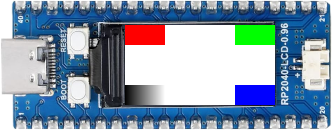
|
|---|
TOP LEFT, TOP RIGHT, BOTTOM RIGHT |
LVGL Basic Sample
Using the LVGL module on top of the Display driver API with chosen display. See also Zephyr sample: LVGL basic sample.
west build -b waveshare_rp2040_lcd_0_96 -p -S usb-console -d build/waveshare_rp2040 zephyr/samples/subsys/display/lvgl
west flash -r uf2 -d build/waveshare_rp2040
The following samples work with the chosen display. That is:
chosen { zephyr,display = &lcd_panel; };lcd_panel: &st7789v_240x135 {};LCD Orientation and Bit Order Test
Using the Display driver API with chosen display. See also Zephyr sample: Display.
west build -b waveshare_rp2040_geek -p -S usb-console -d build/waveshare_rp2040 zephyr/samples/drivers/display
west flash -r uf2 -d build/waveshare_rp2040
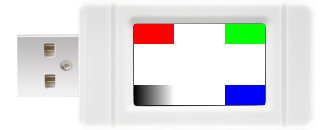
|
|---|
TOP LEFT, TOP RIGHT, BOTTOM RIGHT |
LVGL Basic Sample
Using the LVGL module on top of the Display driver API with chosen display. See also Zephyr sample: LVGL basic sample.
west build -b waveshare_rp2040_geek -p -S usb-console -d build/waveshare_rp2040 zephyr/samples/subsys/display/lvgl
west flash -r uf2 -d build/waveshare_rp2040
TF/microSD Demonstration
This samples and test applications are only applicable on the RP2040-Geek board. They will be built with activated USB-CDC/ACM console.
The following samples work with the chosen SDHC interface in 1-bit mode and connected to SPI. That is:
&spi0 { sdhc0: sdhc@0 { compatible = "zephyr,sdhc-spi-slot"; }; };&sdhc0 { mmc { compatible = "zephyr,sdmmc-disk"; }; };File system manipulation
Using the File Systems API ontop of the Disk Access API with chosen TF/microSD. See also Zephyr sample: File system manipulation.
west build -b waveshare_rp2040_geek -p -S usb-console -d build/waveshare_rp2040 zephyr/samples/subsys/fs/fs_sample
west flash -r uf2 -d build/waveshare_rp2040

The TF/microSD card should be pre-formatted with FAT FS. If there are any files or directories present in the card, the sample lists them out on the console, e.g.:
(optional) Boot Sector: MBR (Master Boot Record)
(optional) 1st Primary Partition: W95 FAT32 (LBA) (ID: 0x0C)
FAT File System: FAT (32-bit version)
Content:
rp2040-geek/RP2040-GEEK.bmp

Simple logging output on target
In case when no files could be listed, because there are none (empty FS),
some.dir directory and other.txt file will be created and
list will run again to show them, e.g.:
(optional) Boot Sector: MBR (Master Boot Record)
(optional) 1st Primary Partition: W95 FAT32 (LBA) (ID: 0x0C)
FAT File System: FAT (32-bit version)
Content: NONE (empty FS)
Simple logging output on target
In there is no FS (or the FS is corrupted), the disk is attempted to re-format to FAT FS and list will run again to show them, e.g.:
Boot Sector: NONE (empty boot sector, no partition table) – (optional) MBR (Master Boot Record)
1st Primary Partition: NONE (empty partition table entry) – (optional) W95 FAT32 (LBA) (ID: 0x0C)
FAT File System: NONE (empty partition)
Content: NONE (empty FS)
Simple logging output on target
Warning
In case when mount fails the device may get re-formatted to FAT FS.
To disable this behaviour disable CONFIG_FS_FATFS_MOUNT_MKFS .
west build -b waveshare_rp2040_geek -p -S usb-console -d build/waveshare_rp2040 zephyr/samples/subsys/fs/fs_sample -- -DCONFIG_FS_FATFS_MOUNT_MKFS=n
west flash -r uf2 -d build/waveshare_rp2040