Mini USB RP2350
The Mini USB RP2350 [10] is a very small, low-cost and versatile Chinese board from different manufactures or AliExpress webshops for Mini USB RP2350 [11]. It has no SWD interface, but a USB-A plug-in connector built directly into the PCB with a direct connection to the RP2350A on-chip USB controller. The Raspberry Pi Pico on-chip USB bootloader allows the ability to flash without any adapter, in a drag-and-drop manner.
Board Overview
Hardware
The Mini USB RP2350 [10] is a mini sized RP2350A development board. The on-board PCB USB-A connector makes it plug-and-play instantly. The castellated module allows soldering direct to carrier boards.
Features and Resources |
Printed Circuit Board |
5V/300㎃ 3.3V/500㎃ 3.3V(OUT) 150㎒ 4㎆/16㎆ 520㎅ RST RGB USB-A UF2 25 16 4 2 2 2
Design Data |
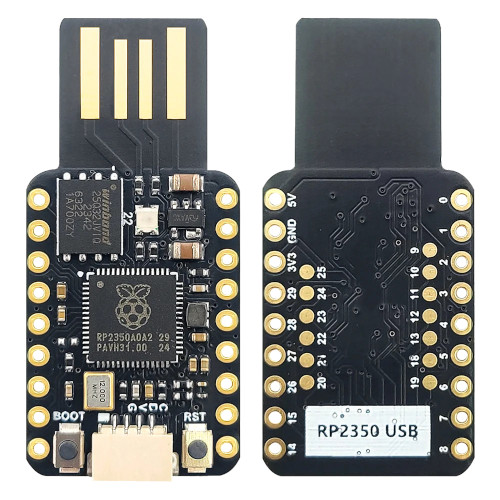
|

Positions
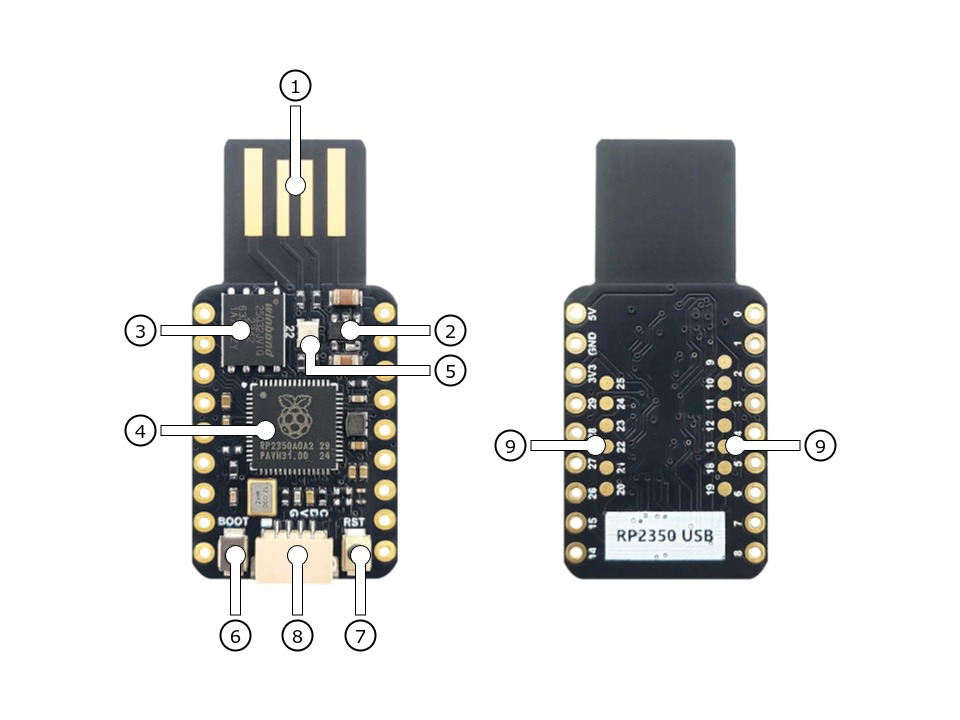
|
|---|
|
Data Sheets
Flash partitions on 4㎆ revision
QSPI NOR-Flash |
code_partition |
storage_partition |
|---|---|---|
primary 4㎆ |
1㎆ |
3㎆ |
secondary N/A |
– |
– |
Flash partitions on 16㎆ revision
QSPI NOR-Flash |
code_partition |
storage_partition |
|---|---|---|
primary 16㎆ |
1㎆ |
15㎆ |
secondary N/A |
– |
– |
Pinouts
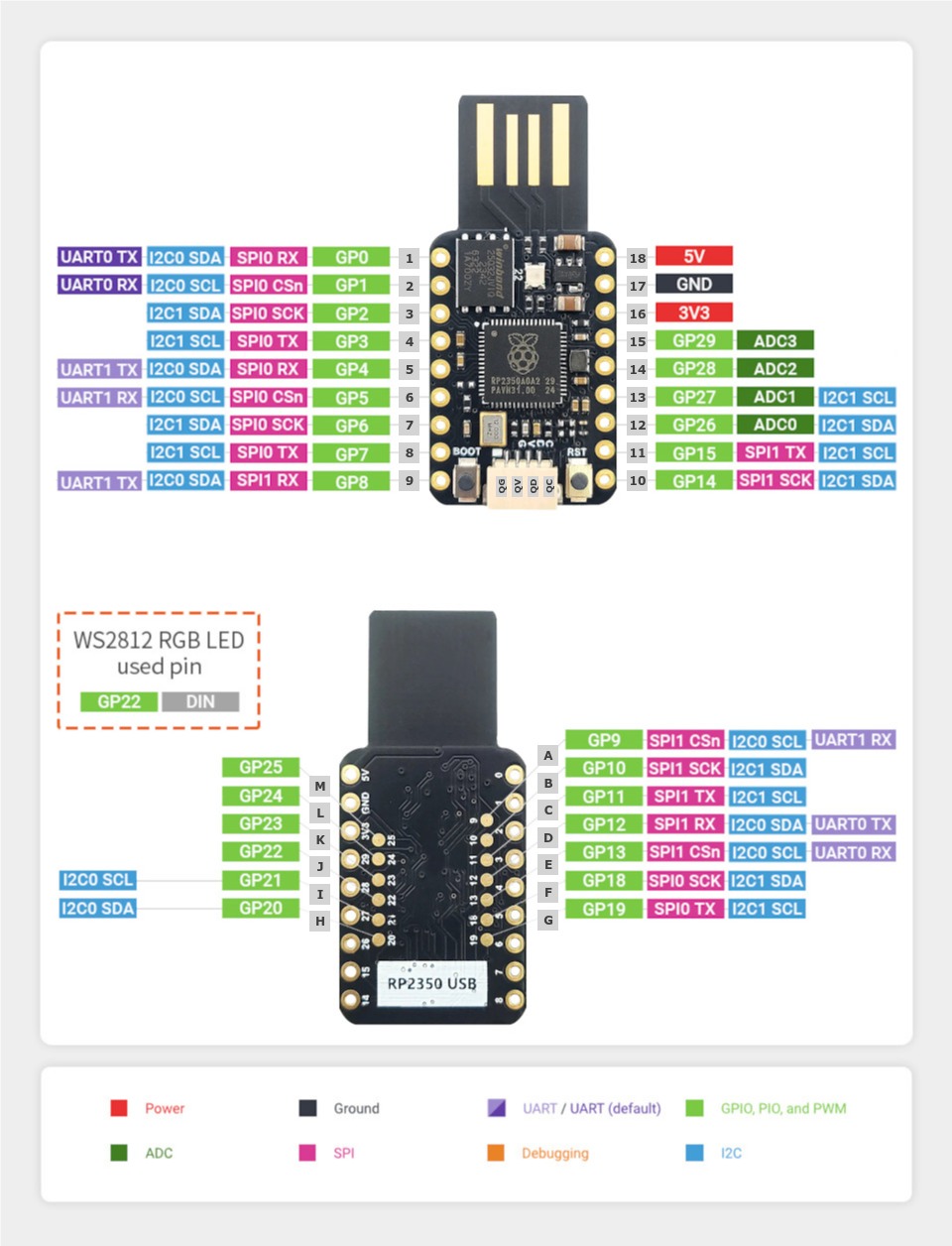
The peripherals of the RP2350 SoC [35] can be routed to various pins on the board. The configuration of these routes can be modified through DTS. Please refer to the datasheet to see the possible routings for each peripheral. The default assignment is showing below.
External pin mapping on the Mini USB RP2350 is not identical to the original Raspberry Pi Pico board. Almost all pins are rearranged in a more compact order. Likewise, the voltage sense and monitoring functions are not integrated. Thus all internal RP2350A GPIO lines are available for free use, insofar there is sufficient space for them on the outer edge of the board or on the bottom side by additional solder points.
GPIO line 22 is not only exclusively routed to the on-board user RGB LED. It is also accessible on the bottom side on one of the 13 solder pads. The analog voltage reference is internally hard-wired to the digital 3.3V power supply and is not decoupled by a simple resistor. There is no option to change this from outside the board.
Pin Mapping |
Pinout |
Default Zephyr Peripheral Mapping
Devicetree compatible |
|
Default Zephyr Peripheral Mapping:
UART0_TX : GP0
UART0_RX : GP1
UART0_CTS : GP2 (optional, not default)
UART0_RTS : GP3 (optional, not default)
SPI0_RX : GP4
SPI0_CSN : GP5
SPI0_SCK : GP6
SPI0_TX : GP7
GPIO8 : GP8 (free usable)
GPIO9 : GP9 (free usable pad)
GPIO10 : GP10 (free usable pad)
GPIO11 : GP11 (free usable pad)
GPIO12 : GP12 (free usable pad)
GPIO13 : GP13 (free usable pad)
I2C1_SDA : GP14
I2C1_SCL : GP15
I2C0_SDA : GP16 (Qwiic)
I2C0_SCL : GP17 (Qwiic)
GPIO18 : GP18 (free usable pad)
GPIO19 : GP19 (free usable pad)
GPIO20 : GP20 (free usable pad)
GPIO21 : GP21 (free usable pad)
PIO0 : GP22
GPIO23 : GP23 (free usable pad)
GPIO24 : GP24 (free usable pad)
GPIO25 : GP25 (free usable pad)
ADC_CH0 : GP26
ADC_CH1 : GP27
ADC_CH2 : GP28
ADC_CH3 : GP29
Supported Features
The Mini USB RP2350 board configuration supports the following hardware features:
Peripheral |
Kconfig option |
Devicetree compatible |
Zephyr API |
|---|---|---|---|
PINCTRL |
|||
GPIO |
|||
UART |
|||
UDC (USB Device Controller) |
|||
I2C |
|||
SPI |
|||
PWM |
|||
ADC |
|||
Temperature (Sensor) |
|||
Timer (Counter) |
|||
Watchdog Timer (WDT) |
|||
Flash |
|||
PIO |
N/A |
||
UART (PIO) |
|||
SPI (PIO) |
|||
WS2812 (PIO) |
|
N/A |
|
DMA |
|||
HWINFO |
N/A |
||
VREG |
|||
RESET |
|||
CLOCK |
|||
NVIC |
N/A |
Nested Vector Interrupts Controller |
|
SYSTICK |
N/A |
|
(!) POWMAN with VREG on RP2350 not yet supported by Zephyr.
See section Peripherals RP2350 in upstream issue: https://github.com/zephyrproject-rtos/zephyr/issues/53810
Other hardware features are not currently supported by Zephyr. The default configuration can be found in the different Kconfig files:
Board Configurations
The Mini USB RP2350 board offers an assembly option with 16㎆ Flash, which is mapped as a hardware revision.
west build -b mini_usb_rp2350/rp2350a/m33
Use the native USB device port with CDC-ACM as Zephyr console and for the shell. Setup QSPI Flash controller to work with 4㎆.
west build -b mini_usb_rp2350@16mb/rp2350a/m33
Use the native USB device port with CDC-ACM as Zephyr console and for the shell. Setup QSPI Flash controller to work with 16㎆.
west build -b mini_usb_rp2350@4mb/rp2350a/m33
Use the native USB device port with CDC-ACM as Zephyr console and for the
shell. Setup QSPI Flash controller to work with 4㎆ – the same as the default
board configuration mini_usb_rp2350.
Connections and IOs
Both the Chinese website about the Mini USB RP2350 [10] and almost all AliExpress retailers provide a few information about the board connections. Some of the data they give is pretty sketchy, especially those provided by retailers, which keep things to the bare minimum and often mess it up. The content provided here is the result of extensive technical evaluation, correction, rectification, and supplementation of this publicly available information.
Laced Grove Signal Interface
The Mini USB RP2350 offers the option of connecting hardware modules via one
single Qwiic/STEMMA QT (Grove connectors). This is provided by a specific
interface for general signal mapping, the Laced Grove Signal Interface.
Following mappings are well known:
grove_gpios: GPIO mappinggrove_pwms: PWM mapping
This is the GPIO signal line mapping from the RP2350 SOC [35] to the
set of Grove connectors provided as Laced Grove Signal Interface.
This list must not be stable!
phandle index to shield –> |
Signal : Meaning |
|
|---|---|---|
|
GP0: UART-TX (UART0/PWM0CHA) |
not wired |
|
GP1: UART-RX (UART0/PWM0CHB) |
not wired |
|
GP2: (UART-CTS) (UART0/PWM1CHA) |
not wired |
|
GP3: (UART-RTS) (UART0/PWM1CHB) |
not wired |
|
GP4: SPI-MISO (SPI0/PWM2CHA) |
not wired |
|
GP5: SPI-CS (SPI0/PWM2CHB) |
not wired |
|
GP6: SPI-CLK (SPI0/PWM3CHA) |
not wired |
|
GP7: SPI-MOSI (SPI0/PWM3CHB) |
not wired |
|
GP8: GPIO/PWM (PWM4CHA) |
not wired |
|
GP9: GPIO/PWM (PWM4CHB) |
not wired |
|
GP10: GPIO/PWM (PWM5CHA) |
not wired |
|
GP11: GPIO/PWM (PWM5CHB) |
not wired |
|
GP12: GPIO/PWM (PWM6CHA) |
not wired |
|
GP13: GPIO/PWM (PWM6CHB) |
not wired |
|
GP14: I2C-SDA (I2C1/PWM7CHA) |
not wired |
|
GP15: I2C-SCL (I2C1/PWM7CHB) |
not wired |
|
GP16: I2C-SDA (I2C0/PWM0CHA) |
<&grove_d17_header 1 …>↳
<&gpio0 16 …> |
|
GP17: I2C-SCL (I2C0/PWM0CHB) |
<&grove_d17_header 0 …>↳
<&gpio0 17 …> |
|
GP18: WS2812 (PWM1CHA) |
not wired |
|
GP19: GPIO/PWM (PWM1CHB) |
not wired |
|
GP20: GPIO/PWM (PWM2CHA) |
not wired |
|
GP21: GPIO/PWM (PWM2CHB) |
not wired |
|
GP22: WS2812 (PWM3CHA) |
not wired (RGB LED) |
|
GP23: GPIO/PWM (PWM3CHB) |
not wired |
|
GP24: GPIO/PWM (PWM4CHA) |
not wired |
|
GP25: GPIO/PWM (PWM4CHB) |
not wired |
|
GP26: ADC0/DIO26 (ADC/PWM5CHA) |
not wired |
|
GP27: ADC1/DIO27 (ADC/PWM5CHB) |
not wired |
|
GP28: ADC2/DIO28 (ADC/PWM6CHA) |
not wired |
|
GP29: ADC3 (ADC/PWM6CHB) |
not wired |
|
||
|
The corresponding mapping is always board or SOC specific. In addition
to the PWM signal line mapping, the valid references to the PWM
function units in the SOC or on the board are therefore also defined
as Grove PWM Labels. The following table reflects the currently
supported mapping for mini_usb_rp2350, but this list will be
growing up with further development and maintenance.
This list must not be complete or stable!
Grove PWM Label |
phandle index to shield –> |
Signal : Meaning |
|
|---|---|---|---|
|
GP0: UART-TX |
not wired (PWM0CHA) |
|
|
GP1: UART-RX |
not wired (PWM0CHB) |
|
|
GP2: (UART-CTS) |
not wired (PWM1CHA) |
|
|
GP3: (UART-RTS) |
not wired (PWM1CHB) |
|
|
GP4: SPI-MISO |
not wired (PWM2CHA) |
|
|
GP5: SPI-CS |
not wired (PWM2CHB) |
|
|
GP6: SPI-CLK |
not wired (PWM3CHA) |
|
|
GP7: SPI-MOSI |
not wired (PWM3CHB) |
|
|
GP8: GPIO/PWM |
not wired (PWM4CHA) |
|
|
GP9: GPIO/PWM |
not wired (PWM4CHB) |
|
|
GP10: GPIO/PWM |
not wired (PWM5CHA) |
|
|
GP11: GPIO/PWM |
not wired (PWM5CHB) |
|
|
GP12: GPIO/PWM |
not wired (PWM6CHA) |
|
|
GP13: GPIO/PWM |
not wired (PWM6CHB) |
|
|
GP14: I2C-SDA |
not wired (PWM7CHA) |
|
|
GP15: I2C-SCL |
not wired (PWM7CHB) |
|
|
|
GP16: I2C-SDA |
|
|
|
GP17: I2C-SCL |
|
|
GP18: GPIO/PWM |
not wired (PWM1CHA) |
|
|
GP19: GPIO/PWM |
not wired (PWM1CHB) |
|
|
GP20: GPIO/PWM |
not wired (PWM2CHA) |
|
|
GP21: GPIO/PWM |
not wired (PWM2CHB) |
|
|
GP22: WS2812 |
not wired (PWM3CHA) |
|
|
GP23: GPIO/PWM |
not wired (PWM3CHB) |
|
|
GP24: GPIO/PWM |
not wired (PWM4CHA) |
|
|
GP25: GPIO/PWM |
not wired (PWM4CHB) |
|
|
GP26: ADC0 |
not wired (PWM5CHA) |
|
|
GP27: ADC1 |
not wired (PWM5CHB) |
|
|
GP28: ADC2 |
not wired (PWM6CHA) |
|
|
GP29: ADC3 |
not wired (PWM6CHB) |
|
|
|||
|
System Clock
The RP2350 [35] MCU is configured to use the 12㎒ external crystal with the on-chip PLL generating the 125㎒ system clock. The internal AHB and APB units are set up in the same way as the upstream Raspberry Pi Pico C/C++ SDK [9] libraries.
GPIO (PWM) Ports
The RP2350 [35] MCU has 1 GPIO cell which covers all I/O pads and 8 PWM function unit each with 2 channels beside a dedicated Timer unit. On the Mini USB RP2350, almost all 16 PWM channels are available on the edge connectors, although some channels are occupied by special signals if their function is enabled.
ADC/TS Ports
The RP2350 [35] MCU has 1 ADC with 4 channels and an additional fifth channel for the on-chip temperature sensor (TS). The ADC channels 0-3 are available on the edge connectors.
The external voltage reference ADC_VREF is directly connected to the 3.3V power supply.
SPI Port
The RP2350 [35] MCU has 2 SPIs. The serial bus SPI0 is connect to external devices over GP7 (MOSI), GP4 (MISO), GP6 (SCK), and GP5 (CSn) on the edge connectors. SPI1 is not available in any default setup.
I2C Port
The RP2350 [35] MCU has 2 I2Cs. The serial bus I2C0 and I2C1 are connect to external devices by default over GP16 (I2C0_SDA), GP17 (I2C0_SCL) on the Grove compatible Qwiic/STEMMA QT connector and GP14 (I2C1_SDA), GP15 (I2C1_SCL) on the edge connectors. I2C1 is available but disabled in any default setup.
Serial Port
The RP2350 [35] MCU has 2 UARTs. One of the UARTs (UART0) is connected to external devices over GP0 (TX) and GP1 (RX) on the edge connectors. Optional the hardware handshake signals GP2 (CTS) and GP3 (RTS) can be used for flow control.
USB Device Port
The RP2350 [35] MCU has a (native) USB device port that can be used to communicate with a host PC. See the USB sample applications for more, such as the USB CDC ACM UART sample sample which sets up a virtual serial port that echos characters back to the host PC. The Mini USB RP2350 provides the Zephyr console per default on the USB port as CDC ACM:
USB device idVendor=2e8a, idProduct=000a, bcdDevice= 4.03
USB device strings: Mfr=1, Product=2, SerialNumber=3
Product: Mini USB RP2350 (CDC ACM)
Manufacturer: Nologo (Raspberry Pi)
SerialNumber: B163A72F0CF0C97A
Programmable I/O (PIO)
The RP2350 SoC comes with three PIO periherals. These are three simple co-processors that are designed for I/O operations. The PIOs run a custom instruction set, generated from a custom assembly language. PIO programs are assembled using pioasm, a tool provided by Raspberry Pi.
Zephyr does not (currently) assemble PIO programs. Rather, they should be manually assembled and embedded in source code. An example of how this is done can be found at drivers/serial/uart_rpi_pico_pio.c.
Sample: SPI via PIO
The samples/sensor/bme280/README.rst sample includes a demonstration of using the PIO SPI driver to communicate with an environmental sensor. The PIO SPI driver supports using any combination of GPIO pins for an SPI bus, as well as allowing up to four independent SPI buses on a single board (using the two SPI devices as well as both PIO devices).
Programming and Debugging
Flashing
Using UF2
You can flash the Mini USB RP2350 with a UF2 file. By default, building an
application for this board will generate a build/zephyr/zephyr.uf2
file. If the board is powered on with the BOOTSEL button pressed, it will
appear on the host as a mass storage device. The UF2 file should be
drag-and-dropped to the device, which will flash the board.
Debugging
There is no SWD interface, thus debugging is not possible on thsi board.
Hello Shell on the USB Console (CDC/ACM)
Hello Shell on @4mb revision (default)
west build -b mini_usb_rp2350/rp2350a/m33 -p -d build/mini_usb_rp2350 bridle/samples/helloshell
west flash -d build/mini_usb_rp2350
Hello Shell on @16mb revision
west build -b mini_usb_rp2350@16mb/rp2350a/m33 -p -d build/mini_usb_rp2350 bridle/samples/helloshell
west flash -d build/mini_usb_rp2350
Simple test execution on target
(text in bold is a command input)
System
uart:~$ hwinfo devid
Length: 8
ID: 0xbd774b2618daaa7d

uart:~$ kernel version
Zephyr version 4.3.0

uart:~$ bridle version
Bridle version 4.3.0

uart:~$ bridle version long
Bridle version 4.3.0.0

uart:~$ bridle info
Zephyr: 4.3.0
Bridle: 4.3.0
Devices
On board revision
@4mbor@16mb:uart:~$ device list devices: - clock-controller@40010000 (READY) DT node labels: clocks - reset-controller@40020000 (READY) DT node labels: reset - cdc-acm-console-uart (READY) DT node labels: cdc_acm_console_uart - uart@40070000 (READY) DT node labels: uart0 - watchdog@400d8000 (READY) DT node labels: wdt0 - timer@400b8000 (READY) DT node labels: timer1 - timer@400b0000 (READY) DT node labels: timer0 - pio@50200000 (READY) DT node labels: ((pio_hw_t *)0x50200000u) - dma@50000000 (READY) DT node labels: dma - gpio-port@0 (READY) DT node labels: gpio0 gpio0_lo - usbd@50110000 (READY) DT node labels: usbd zephyr_udc0 - adc@400a0000 (READY) DT node labels: adc - flash-controller@400d0000 (READY) DT node labels: qmi - i2c@40090000 (READY) DT node labels: i2c0 grove_i2c - dietemp (READY) DT node labels: die_tempTimer
Operate with the tow on-chip timer units:
uart:~$ timer oneshot timer0 0 1000000
timer: Alarm triggered
uart:~$ timer oneshot timer1 0 1000000 timer: Alarm triggeredDie Temperature Sensor
Operate with the on-chip temperature sensor on ADC channel 4:
uart:~$ sensor info
device name: dietemp, vendor: Raspberry Pi Foundation, model: pico-temp, friendly name: RP2350 chip temperature
uart:~$ sensor get dietemp channel type=12(die_temp) index=0 shift=5 num_samples=1 value=122018715213ns (28.162114)ADC Channel
Operate with the ADC channels 0 until 4:
uart:~$ adc adc@400a0000 resolution 12uart:~$ adc adc@400a0000 read 0 read: 973uart:~$ adc adc@400a0000 read 1 read: 684uart:~$ adc adc@400a0000 read 2 read: 795uart:~$ adc adc@400a0000 read 3 read: 682uart:~$ adc adc@400a0000 read 4 read: 876Flash Controller
Erase, Write and Verify
uart:~$ flash read qmi e0000 40
000E0000: ff ff ff ff ff ff ff ff  ff ff ff ff ff ff ff ff |........ ........|
000E0010: ff ff ff ff ff ff ff ff  ff ff ff ff ff ff ff ff |........ ........|
000E0020: ff ff ff ff ff ff ff ff  ff ff ff ff ff ff ff ff |........ ........|
000E0030: ff ff ff ff ff ff ff ff  ff ff ff ff ff ff ff ff |........ ........|

uart:~$ flash test qmi e0000 1000 2
Erase OK.
Write OK.
Verified OK.
Erase OK.
Write OK.
Verified OK.
Erase-Write-Verify test done.
Details
uart:~$ flash read qmi e0000 40
000E0000: 00 01 02 03 04 05 06 07  08 09 0a 0b 0c 0d 0e 0f |........ ........|
000E0010: 10 11 12 13 14 15 16 17  18 19 1a 1b 1c 1d 1e 1f |........ ........|
000E0020: 20 21 22 23 24 25 26 27  28 29 2a 2b 2c 2d 2e 2f | !"#$%&' ()*+,-./|
000E0030: 30 31 32 33 34 35 36 37  38 39 3a 3b 3c 3d 3e 3f |01234567 89:;<=>?|

uart:~$ flash page_info e0000
Page for address 0xe0000:
start offset: 0xe0000
size: 4096
index: 224
Revert
uart:~$ flash erase qmi e0000 1000
Erase success.

uart:~$ flash read qmi e0000 40
000E0000: ff ff ff ff ff ff ff ff  ff ff ff ff ff ff ff ff |........ ........|
000E0010: ff ff ff ff ff ff ff ff  ff ff ff ff ff ff ff ff |........ ........|
000E0020: ff ff ff ff ff ff ff ff  ff ff ff ff ff ff ff ff |........ ........|
000E0030: ff ff ff ff ff ff ff ff  ff ff ff ff ff ff ff ff |........ ........|
I2C on Qwiic with BMP280
The Mini USB RP2350 has no on-board I2C devices. For this example an Grove Temperature and Barometer Sensor – BMP280 [22] was plugged into the Qwiic connector.
uart:~$ i2c scan i2c0
     0  1  2  3  4  5  6  7  8  9  a  b  c  d  e  f
00:             -- -- -- -- -- -- -- -- -- -- -- --
10: -- -- -- -- -- -- -- -- -- -- -- -- -- -- -- --
20: -- -- -- -- -- -- -- -- -- -- -- -- -- -- -- --
30: -- -- -- -- -- -- -- -- -- -- -- -- -- -- -- --
40: -- -- -- -- -- -- -- -- -- -- -- -- -- -- -- --
50: -- -- -- -- -- -- -- -- -- -- -- -- -- -- -- --
60: -- -- -- -- -- -- -- -- -- -- -- -- -- -- -- --
70: -- -- -- -- -- -- -- 77
1 devices found on i2c0
The I2C address
0x77is a Bosch BMP280 Air Pressure Sensor and their Chip-ID can read from register0xd0. The Chip-ID must be0x58:uart:~$ i2c read_byte i2c0 77 d0 Output: 0x58
More Samples
LED Blinky and Fade
Hint
Neither LED Blinky nor LED Fade can be built and executed on standard Mini USB RP2350, because this system has only one digital RGB LED. A simple GPIO or PWM control is not possible!
WS2812 LED Test Pattern by PIO
west build -b mini_usb_rp2350/rp2350a/m33 -p -d build/mini_usb_rp2350 zephyr/samples/drivers/led/led_strip
west flash -d build/mini_usb_rp2350
Simple test execution on target
Console Output
*** Booting Zephyr OS build v4.3.0…***
[00:00:00.001,000] <inf> main: Found LED strip device ws2812-single
[00:00:00.001,000] <inf> main: Displaying pattern on strip
Grove Module Samples
All currently supported Grove modules can be reused on the Qwiic / STEMMA QT connector using a conversion cable. Only the corresponding shield stacks need to be specified.
Hello Shell with sensor access to Grove BMP280
west build -b mini_usb_rp2350/rp2350a/m33 -p --shield "grove_sens_bmp280" -d build/mini_usb_rp2350 bridle/samples/helloshell
west flash -d build/mini_usb_rp2350
Simple test execution on target
(text in bold is a command input)
Devices
Only an excerpt from the full list:
uart:~$ device list
devices:
  … … …
- bmp280@77 (READY)
  … … …
Sensor access from Zephyr Shell
uart:~$ sensor info
device name: dietemp, vendor: Raspberry Pi Foundation, model: pico-temp, friendly name: RP2350 chip temperature
device name: bmp280@77, vendor: Bosch Sensortec GmbH, model: bme280, friendly name: Grove TP Sensor V1.0 (BME280)
uart:~$ sensor get bmp280@77 channel type=13(ambient_temp) index=0 shift=16 num_samples=1 value=42141326449ns (22.519989) channel type=14(press) index=0 shift=23 num_samples=1 value=42141326449ns (99.312500) channel type=16(humidity) index=0 shift=21 num_samples=1 value=42141326449ns (0.000000)