Microchip MCP2515 CAN bus shields
Zephyr supports a couple of different shields carrying the Microchip MCP2515 Stand-Alone CAN Controller with SPI Interface.
DFRobot CAN BUS Shield V2.0
Overview
The DFRobot CAN BUS shield supports the Microchip MCP2515 stand-alone CAN controller and JTA1050 high speed CAN transceiver. The shield has an Arduino Uno R3 compatible hardware interface.
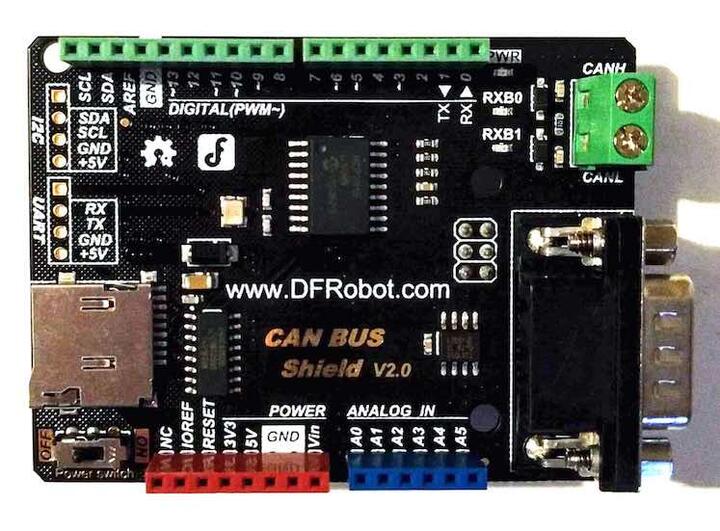
Hardware
MCP2515
Stand-Alone CAN 2.0B Controller
Up to 1Mb/s baud rate
Standard and extended data and remote frames
3x Tx Buffers
2x Rx Buffers
6x 29-bit Filters
2x 29-bit Masks
Interrupt output
One shot mode
High speed SPI interface (10 MHz)
TJA1050
Fully compatible with the “ISO 11898” standard
High speed (up to 1 Mbaud)
Connectivity
Industrial standard DB9 terminal (CAN)
Screw terminals (CAN)
Integrated MicroSD socket for data storage (SPI)
Arduino Uno R3 compatible (SPI)
Name |
Function |
Usage |
|---|---|---|
A0 |
None |
|
A1 |
None |
|
A2 |
None |
|
A3 |
None |
|
A4 |
None |
|
A5 |
None |
|
D0 |
RX |
Ext. header only |
D1 |
TX |
Ext. header only |
D2 |
GPIO_ACTIVE_LOW |
MCP2515 - INT |
D3 |
None |
|
D4 |
SPI-CS |
MicroSD |
D5 |
None |
|
D6 |
None |
|
D7 |
None |
|
D8 |
None |
|
D9 |
None |
|
D10 |
SPI-CS |
MCP2515 |
D11 |
SPI-MOSI |
MCP2515 / MicroSD |
D12 |
SPI-MISO |
MCP2515 / MicroSD |
D13 |
SPI-CLK |
MCP2515 / MicroSD |
D14 |
I2C-SDA |
Ext. header only |
D15 |
I2C_SCL |
Ext. header only |
Power Supply
3.3V ~ 5V
Components
Power switch
Power LED
RX0BF LED
RX1BF LED
For more information about the DFRobot CAN-BUS V2.0 shield:
Keyestudio CAN-BUS Shield (KS0411)
Overview
The Keyestudio CAN BUS shield supports the Microchip MCP2515 stand-alone CAN controller and MCP2551 high speed CAN transceiver. The shield has an Arduino Uno R3 compatible hardware interface.
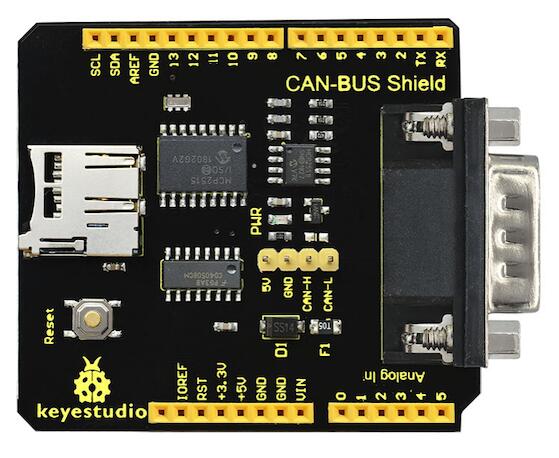
Keyestudio CAN-BUS Shield (KS0411) (Credit: Keyestudio)
Hardware
MCP2515
Stand-Alone CAN 2.0B Controller
Up to 1Mb/s baud rate
Standard and extended data and remote frames
3x Tx Buffers
2x Rx Buffers
6x 29-bit Filters
2x 29-bit Masks
Interrupt output
One shot mode
High speed SPI interface (10 MHz)
MCP2551
Fully compatible with the “ISO 11898” standard
High speed (up to 1 Mbaud)
Connectivity
Industrial standard DB9 terminal (CAN)
Pin headers (CAN)
Integrated MicroSD socket for data storage (SPI)
Arduino Uno R3 compatible (SPI)
Name |
Function |
Usage |
|---|---|---|
A0 |
None |
|
A1 |
None |
|
A2 |
None |
|
A3 |
None |
|
A4 |
None |
|
A5 |
None |
|
D0 |
RX |
Ext. header only |
D1 |
TX |
Ext. header only |
D2 |
None |
|
D3 |
None |
|
D4 |
None |
|
D5 |
None |
|
D6 |
None |
|
D7 |
None |
|
D8 |
GPIO_ACTIVE_LOW |
MCP2515 - INT |
D9 |
SPI-CS |
MicroSD |
D10 |
SPI-CS |
MCP2515 |
D11 |
SPI-MOSI |
MCP2515 / MicroSD |
D12 |
SPI-MISO |
MCP2515 / MicroSD |
D13 |
SPI-CLK |
MCP2515 / MicroSD |
D14 |
I2C-SDA |
Ext. header only |
D15 |
I2C_SCL |
Ext. header only |
Power Supply
5.0VDC
For more information about the Keyestudio CAN-BUS shield:
ElecFreaks CAN-BUS Shield (EF02037)
Overview
The ElecFreaks CAN BUS shield supports the Microchip MCP2515 stand-alone CAN controller and MCP2551 high speed CAN transceiver. The shield has an Arduino Uno R3 compatible hardware interface.
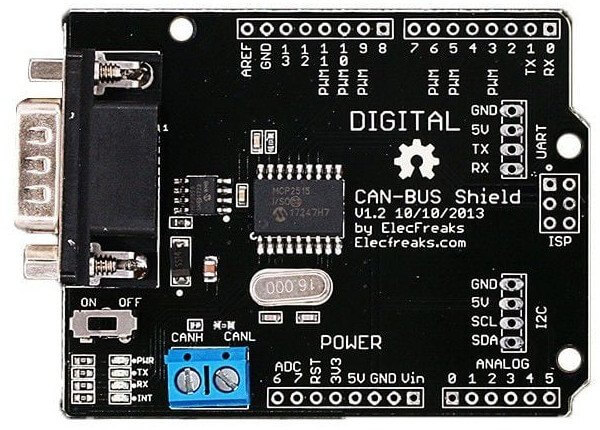
ElecFreaks CAN-BUS Shield (EF02037) (Credit: ElecFreaks)
The ElecFreaks CAN-BUS Shield can also be found as CAN-BUS Shield v1.2 by DiyMore. Both shields are pin and function compatible. Furthermore, the wiring of the MCP2515 is also compatible with the CAN-BUS Shield v1.5 by Elecrow. On the Elecrow shield, three missing 0 Ohm bridges must be manually soldered to ensure that the SPI signals are also connected to the Arduino Uno R3 pin header. Although the Elecrow shield has a microSD socket, the slot can only be used in systems with a 5V signal level on SPI.
Hardware
MCP2515
Stand-Alone CAN 2.0B Controller
Up to 1Mb/s baud rate
Standard and extended data and remote frames
3x Tx Buffers
2x Rx Buffers
6x 29-bit Filters
2x 29-bit Masks
Interrupt output
One shot mode
High speed SPI interface (10 MHz)
MCP2551
Fully compatible with the “ISO 11898” standard
High speed (up to 1 Mbaud)
Connectivity
Industrial standard DB9 terminal (CAN)
Screw terminal block - 2-pin 5.0mm (CAN)
Arduino Uno R3 compatible (SPI)
Name |
Function |
Usage |
|---|---|---|
A0 |
I2C-SDA |
Ext. header only |
A1 |
I2C-SCL |
Ext. header only |
A2 |
None |
|
A3 |
None |
|
A4 |
None |
|
A5 |
None |
|
D0 |
RX |
Ext. header only |
D1 |
TX |
Ext. header only |
D2 |
GPIO_ACTIVE_LOW |
MCP2515 - INT |
D3 |
None |
|
D4 |
SPI-CS |
(MicroSD) |
D5 |
None |
|
D6 |
None |
|
D7 |
None |
|
D8 |
None |
|
D9 |
None |
|
D10 |
SPI-CS |
MCP2515 |
D11 |
SPI-MOSI |
MCP2515 / (MicroSD) |
D12 |
SPI-MISO |
MCP2515 / (MicroSD) |
D13 |
SPI-CLK |
MCP2515 / (MicroSD) |
D14 |
None |
|
D15 |
None |
Power Supply
5.0VDC
For more information about the ElecFreaks CAN-BUS shield:
Adafruit PiCowbell CAN Bus Shield for Pico
Overview
The Adafruit PiCowbell CAN Bus Shield uses the Microchip MCP2515 controller with an TJA1051/3 transceiver. This shield is built for the Raspberry Pi Pico and uses the SPI interface. It also contains a Qwiic connector to add support for a sensor.
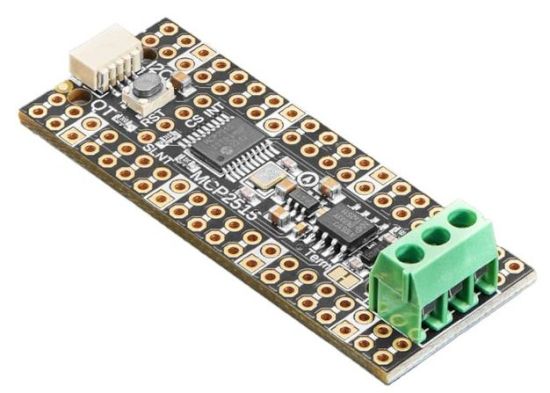
Adafruit PiCowbell CAN Bus Shield
Hardware
MCP2515
Stand-Alone CAN 2.0B Controller
Up to 1Mb/s baud rate
Standard and extended data and remote frames
3x Tx Buffers
2x Rx Buffers
6x 29-bit Filters
2x 29-bit Masks
Interrupt output
One shot mode
High speed SPI interface (10 MHz)
TJA1051
Fully compatible with the “ISO 11898-2:2016”, “SAE J2284-1” & “SAE J2284-5” standards
Supports CAN FD
Fast data rates (up to 5 Mbit/s)
Connectivity
Terminal Block - 3-pin 3.5mm (CAN)
Raspberry Pi Pico compatible (SPI)
Name |
Function |
Usage |
|---|---|---|
GP0 |
None |
|
GP1 |
None |
|
GP2 |
None |
|
GP3 |
None |
|
GP4 |
None |
|
GP5 |
None |
|
GP6 |
None |
|
GP7 |
None |
|
GP8 |
None |
|
GP9 |
None |
|
GP10 |
None |
|
GP11 |
None |
|
GP12 |
None |
|
GP13 |
None |
|
GP14 |
None |
|
GP15 |
None |
|
GP16 |
SPI-MISO |
MCP2515 |
GP17 |
None |
|
GP18 |
SPI-SCK |
MCP2515 |
GP19 |
SPI-MOSI |
MCP2515 |
GP20 |
SPI-CS |
MCP2515 |
GP21 |
GPIO_ACTIVE_LOW |
MCP2515 - INT |
GP22 |
None |
|
GP23 |
None |
|
GP24 |
None |
|
GP25 |
None |
|
GP26 |
None |
|
GP27 |
None |
|
GP28 |
None |
Power Supply
3.3V ~ 5V
For more information about the Adafruit PiCowbell CAN Bus shield:
Waveshare Pico-CAN-B Shield for Pico
Overview
The Waveshare Pico-CAN-B Shield uses the Microchip MCP2515 controller with an SN65HVD230 transceiver. This shield is built for the Raspberry Pi Pico (W) or Pico 2(W) or compatible boards and uses the SPI interface, but not in the standardized pin assignment.
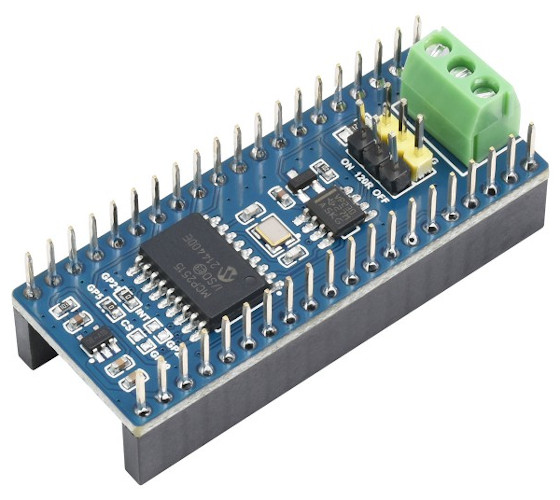
Waveshare Pico-CAN-B Shield
Hardware
The Waveshare Pico-CAN-B Shield requires the SPI bus on Raspberry Pi Pico header pins that are not standardized for Zephyr. They conflict with the standardized use of the two I2C buses on GPIO lines 4 to 7. The shield resolves this conflict by swapping the pins of SPI0 with I2C0, and I2C1.
However, in a stacked configuration with multiple shields on a Raspberry Pi Pico or Pico 2 or compatible board, this means that the physical capabilities must be carefully checked.
MCP2515
Stand-Alone CAN 2.0B Controller
Up to 1Mb/s baud rate
Standard and extended data and remote frames
3x Tx Buffers
2x Rx Buffers
6x 29-bit Filters
2x 29-bit Masks
Interrupt output
One shot mode
High speed SPI interface (10 MHz)
SN65HVD230
Fully compatible with the “ISO 11898” standard
High speed (up to 1 Mbaud)
Connectivity
Screw terminal block - 3-pin 3.5mm (CAN)
Pin header - 3-pin 100mil (CAN)
Pin header - 3-pin 100mil (CAN bus termination)
Raspberry Pi Pico header (SPI)
Raspberry Pi Pico conflicts with SPI, and both I2C
Name |
Function (original) |
Usage |
|---|---|---|
GP0 |
None |
|
GP1 |
None |
|
GP2 |
None |
|
GP3 |
None |
|
GP4 |
SPI-MISO (I2C0-SDA) |
MCP2515 |
GP5 |
SPI-CS (I2C0-SCL) |
MCP2515 |
GP6 |
SPI-SCK (I2C1-SDA) |
MCP2515 |
GP7 |
SPI-MOSI (I2C1-SCL) |
MCP2515 |
GP8 |
None |
|
GP9 |
None |
|
GP10 |
None |
|
GP11 |
None |
|
GP12 |
None |
|
GP13 |
None |
|
GP14 |
None |
|
GP15 |
None |
|
GP16 |
I2C0-SDA |
(re-routed) |
GP17 |
I2C0-SCL |
(re-routed) |
GP18 |
I2C1-SDA |
(re-routed) |
GP19 |
I2C1-SCL |
(re-routed) |
GP20 |
None |
|
GP21 |
GPIO_ACTIVE_LOW |
MCP2515 - INT |
GP22 |
None |
|
GP23 |
None |
|
GP24 |
None |
|
GP25 |
None |
|
GP26 |
None |
|
GP27 |
None |
|
GP28 |
None |
Power Supply
3.3V ~ 5V
For more information about the Waveshare Pico-CAN-B shield:
Seeed Studio XIAO CAN Bus Shield
Overview
The Seeed Studio XIAO CAN Bus Shield is specifically designed to work with Seeed Studio XIAO series development boards. It uses the Microchip MCP2515 CAN controller with an SN65HVD230 high speed CAN transceiver. The shield has an Seeed Studio XIAO compatible hardware interface.
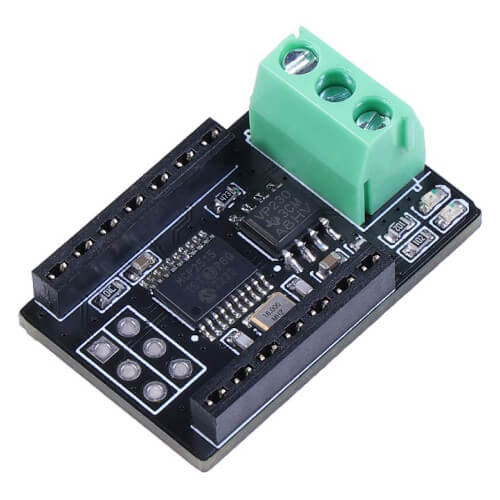
Seeed Studio XIAO CAN Bus Shield
Hardware
The Seeed Studio XIAO CAN Bus Shield requires the SPI chip-select and interrupt line on Seeed Studio XIAO header pins that are not standardized for Zephyr. They conflict with the standardized use of the first UART on pin D6 (TX) and D7 (RX). The shield resolves this conflict by disabling the UART.
This means that the Zephyr console can no longer be accessed via the serial
interface, an alternative such as the USB CDC/ACM class must be used instead,
e.g. with --snippet cdc-acm-console when you invoke west build.
MCP2515
Stand-Alone CAN 2.0B Controller
Up to 1Mb/s baud rate
Standard and extended data and remote frames
3x Tx Buffers
2x Rx Buffers
6x 29-bit Filters
2x 29-bit Masks
Interrupt output
One shot mode
High speed SPI interface (10 MHz)
SN65HVD230
Fully compatible with the “ISO 11898” standard
High speed (up to 1 Mbaud)
Connectivity
Screw terminal block - 3-pin 3.5mm (CAN)
Solder pad for CAN bus termination
Seeed Studio XIAO compatible (SPI)
Name |
Function (original) |
Usage |
|---|---|---|
D0 |
None |
|
D1 |
None |
|
D2 |
None |
|
D3 |
None |
|
D4 |
None (I2C-SDA) |
|
D5 |
None (I2C-SCL) |
|
D6 |
GPIO_ACTIVE_LOW (TX) |
MCP2515 - INT |
D7 |
SPI-CS (RX) |
MCP2515 |
D8 |
SPI-CLK |
MCP2515 |
D9 |
SPI-MOSI |
MCP2515 |
D10 |
SPI-MISO |
MCP2515 |
Power Supply
3.3V ~ 5V
For more information about the Seeed Studio XIAO CAN Bus shield:
Programming
Set --shield dfrobot_can_bus_v2_0 or --shield keyestudio_can_bus_ks0411
or --shield adafruit_can_picowbell or --shield waveshare_pico_can_b
or --shield seeed_xiao_can when you invoke west build or cmake
in your Zephyr application. For example:
Using west:
# From the root of the zephyr repository
west build -b nrf52dk/nrf52832 --shield dfrobot_can_bus_v2_0 samples/drivers/can/counter
west flash
Using CMake and ninja:
# From the root of the zephyr repository
# Use cmake to configure a Ninja-based buildsystem:
cmake -Bbuild -GNinja -DBOARD=nrf52dk/nrf52832 -DSHIELD="dfrobot_can_bus_v2_0" samples/drivers/can/counter

# Now run the build tool on the generated build system:
ninja -Cbuild
ninja -Cbuild flash
Using west:
# From the root of the zephyr repository
west build -b nrf52840dk/nrf52840 --shield keyestudio_can_bus_ks0411 samples/drivers/can/counter
west flash
Using CMake and ninja:
# From the root of the zephyr repository
# Use cmake to configure a Ninja-based buildsystem:
cmake -Bbuild -GNinja -DBOARD=nrf52840dk/nrf52840 -DSHIELD="keyestudio_can_bus_ks0411" samples/drivers/can/counter

# Now run the build tool on the generated build system:
ninja -Cbuild
ninja -Cbuild flash
Using west:
# From the root of the zephyr repository
west build -b rpi_pico --shield adafruit_can_picowbell samples/drivers/can/counter
Using CMake and ninja:
# From the root of the zephyr repository
# Use cmake to configure a Ninja-based buildsystem:
cmake -Bbuild -GNinja -DBOARD=rpi_pico -DSHIELD="adafruit_can_picowbell" samples/drivers/can/counter

# Now run the build tool on the generated build system:
ninja -Cbuild
Using west:
# From the root of the zephyr repository
west build -b rpi_pico --shield waveshare_pico_can_b samples/drivers/can/counter
Using CMake and ninja:
# From the root of the zephyr repository
# Use cmake to configure a Ninja-based buildsystem:
cmake -Bbuild -GNinja -DBOARD=rpi_pico -DSHIELD="waveshare_pico_can_b" samples/drivers/can/counter

# Now run the build tool on the generated build system:
ninja -Cbuild
Using west:
# From the root of the zephyr repository
west build -b xiao_rp2040 -S cdc-acm-console --shield seeed_xiao_can samples/drivers/can/counter
Using CMake and ninja:
# From the root of the zephyr repository
# Use cmake to configure a Ninja-based buildsystem:
cmake -Bbuild -GNinja -DBOARD=xiao_rp2040 -DSNIPPET="cdc-acm-console" -DSHIELD="seeed_xiao_can" samples/drivers/can/counter

# Now run the build tool on the generated build system:
ninja -Cbuild