GPIO Loopback
Overview
See tests/drivers/gpio for the original scope of tests, its structure and description.
Requirements
You will need an ST-LINK/V2 debug tool adapter already connected to the TiaC Magpie board, which has an already configured UART console connection.
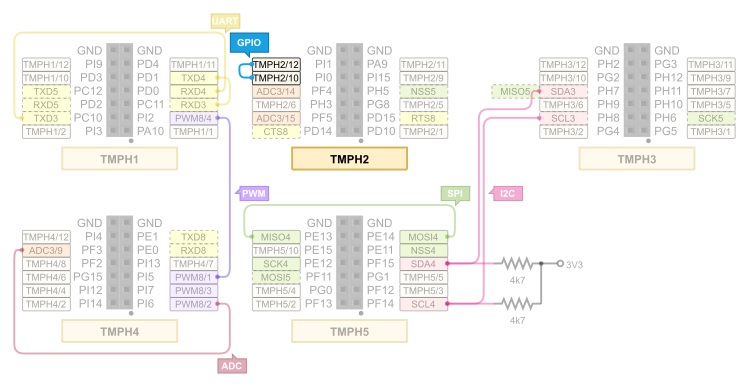
On the TiaC MAGPIE pin headers the following GPIO pins must be connected.
Building and Running
Build and run the tests on target as follows:
$ west twister \
         --verbose --jobs 4 --inline-logs \
         --enable-size-report --platform-reports \
         --device-testing --hardware-map map.yaml \
         --extra-args SHIELD="loopback_test_tmph" \
         --alt-config-root bridle/zephyr/alt-config/tests \
         --testsuite-root zephyr/tests --tag gpio
You should see the following messages on host console:
Device testing on:

| Platform                  | ID       | Serial device   |
|---------------------------|----------|-----------------|
| magpie_f777ni/stm32f777xx | DT04BNT1 | /dev/ttyUSB0    |

INFO    - JOBS: 4
INFO    - Adding tasks to the queue...
INFO    - Added initial list of jobs to queue
INFO    - 1/4 magpie_f777ni/stm32f777xx drivers.gpio.gpio_nrf                              FILTERED (runtime filter)
INFO    - 2/4 magpie_f777ni/stm32f777xx drivers.gpio.get_direction                         PASSED (device: DT04BNT1, 2.520s <zephyr/gnu>)
INFO    - 3/4 magpie_f777ni/stm32f777xx drivers.gpio.1pin                                  PASSED (device: DT04BNT1, 9.487s <zephyr/gnu>)
INFO    - 4/4 magpie_f777ni/stm32f777xx drivers.gpio.2pin                                  PASSED (device: DT04BNT1, 17.945s <zephyr/gnu>)

INFO    - 3090 test scenarios (2888 configurations) selected, 2885 configurations filtered (2884 by static filter, 1 at runtime).
INFO    - 3 of 3 executed test configurations passed (100.00%), 0 built (not run), 0 failed, 0 errored, with no warnings in 104.13 seconds.
INFO    - 28 of 28 executed test cases passed (100.00%) on 1 out of total 1511 platforms (0.07%).
INFO    - 11 selected test cases not executed: 11 skipped.
INFO    - 3 test configurations executed on platforms, 0 test configurations were only built.

Hardware distribution summary:

| Board                     | ID       |   Counter |   Failures |
|---------------------------|----------|-----------|------------|
| magpie_f777ni/stm32f777xx | DT04BNT1 |         3 |          0 |

INFO    - Saving reports...
INFO    - Writing JSON report .../twister-out/twister.json
INFO    - Writing xunit report .../twister-out/twister.xml...
INFO    - Writing xunit report .../twister-out/twister_report.xml...
INFO    - Writing target report for magpie_f777ni/stm32f777xx...
INFO    - Writing JSON report .../twister-out/magpie_f777ni_stm32f777xx.json
INFO    - Run completed